1
   

Pop-under advertising - very persistent


Aremah
 
Reply Thu 23 Feb, 2006 06:38 am
I just recently formatted my drive and rebuilt my system. I installed all the critical updates and SP2, and everything was going fine until I started getting pop-ups of two sorts (after running a supposed key generator program). The first is just a pop-up window with various advertisments (that appears even when IE is closed), the second is called "Pop-under advertising" and only appears on the taskbar - there's no actual ad or window visible. Also, the Task Manager is "disabled by the admin" (becomes enabled again after SpyBot removes the entry it finds, but only until reboot). The PowerToy TweakUI remains disabled, however (can't run it).

Tried to remove it with what I had on my system, first in normal mode, then in safe mode, but to no avail - the bugger is very persistent.

AdAware finds something it labels as "Windows" (which is made up of two registry keys), but cannot remove it permanently.

SpyBot S&D finds an entry called "WindowsSecurityCenter.TaskManager", but also fails to remove it permanently.

ewido, AboutBuster, CWShredder, NAV and Stinger find nothing.

HijackThis:
My emphasis in bold is one file that I'm certain is the cause, since I started getting the ads after running it (keygen.exe), although it was in an entirely different location; I'd rather not remove it on my own, however, because I want to make sure it stays gone once it's gone - and you guys can do that Wink I'm also pretty sure Creative Remote Centre wasn't there before, but I could be wrong - it certainly did not autostart before.

Logfile of HijackThis v1.99.1
Scan saved at 12:00:54, on 2006-02-23
Platform: Windows XP Dodatek SP2 (WinNT 5.01.2600)
MSIE: Internet Explorer v6.00 SP2 (6.00.2900.2180)

Running processes:
C:\WINDOWS\System32\smss.exe
C:\WINDOWS\system32\winlogon.exe
C:\WINDOWS\system32\services.exe
C:\WINDOWS\system32\lsass.exe
C:\WINDOWS\System32\Ati2evxx.exe
C:\WINDOWS\system32\svchost.exe
C:\WINDOWS\System32\svchost.exe
C:\WINDOWS\system32\spoolsv.exe
C:\WINDOWS\system32\Ati2evxx.exe
C:\Program Files\Common Files\Symantec Shared\ccEvtMgr.exe
C:\WINDOWS\System32\CTsvcCDA.exe
C:\Program Files\ewido anti-malware\ewidoctrl.exe
C:\WINDOWS\Explorer.EXE
C:\Program Files\Norton SystemWorks\Norton AntiVirus\navapsvc.exe
C:\Program Files\Norton SystemWorks\Norton Utilities\NPROTECT.EXE
C:\PROGRA~1\NORTON~1\SPEEDD~1\nopdb.exe
C:\Program Files\Alcohol Soft\Alcohol 120\StarWind\StarWindService.exe
C:\WINDOWS\System32\svchost.exe
C:\WINDOWS\System32\MsPMSPSv.exe
C:\Program Files\Common Files\Symantec Shared\Security Center\SymWSC.exe
C:\Program Files\ATI Technologies\ATI.ACE\cli.exe
C:\Program Files\Logitech\iTouch\iTouch.exe
C:\Program Files\Logitech\MouseWare\system\em_exec.exe
C:\Program Files\Common Files\Symantec Shared\ccApp.exe
C:\WINDOWS\system32\CTHELPER.EXE
C:\Program Files\W-Update\Keygen.exe
C:\Program Files\ATI Technologies\ATI.ACE\cli.exe
C:\Program Files\Internet Explorer\iexplore.exe
C:\Program Files\Messenger\msmsgs.exe
C:\HJT\HijackThis.exe

R0 - HKCU\Software\Microsoft\Internet Explorer\Main,Start Page = http://www.google.pl/
R0 - HKCU\Software\Microsoft\Internet Explorer\Toolbar,LinksFolderName = Łącza
O2 - BHO: AcroIEHlprObj Class - {06849E9F-C8D7-4D59-B87D-784B7D6BE0B3} - C:\Program Files\Adobe\Acrobat 7.0\ActiveX\AcroIEHelper.dll
O2 - BHO: (no name) - {53707962-6F74-2D53-2644-206D7942484F} - C:\PROGRA~1\SPYBOT~1\SDHelper.dll
O2 - BHO: NAV Helper - {BDF3E430-B101-42AD-A544-FADC6B084872} - C:\Program Files\Norton SystemWorks\Norton AntiVirus\NavShExt.dll
O3 - Toolbar: Norton AntiVirus - {42CDD1BF-3FFB-4238-8AD1-7859DF00B1D6} - C:\Program Files\Norton SystemWorks\Norton AntiVirus\NavShExt.dll
O4 - HKLM\..\Run: [ATICCC] "C:\Program Files\ATI Technologies\ATI.ACE\cli.exe" runtime -Delay
O4 - HKLM\..\Run: [zBrowser Launcher] C:\Program Files\Logitech\iTouch\iTouch.exe
O4 - HKLM\..\Run: [Logitech Utility] Logi_MwX.Exe
O4 - HKLM\..\Run: [ccApp] "C:\Program Files\Common Files\Symantec Shared\ccApp.exe"
O4 - HKLM\..\Run: [ccRegVfy] "C:\Program Files\Common Files\Symantec Shared\ccRegVfy.exe"
O4 - HKLM\..\Run: [Symantec NetDriver Monitor] C:\PROGRA~1\SYMNET~1\SNDMon.exe /Consumer
O4 - HKLM\..\Run: [WINDVDPatch] CTHELPER.EXE
O4 - HKLM\..\Run: [UpdReg] C:\WINDOWS\UpdReg.EXE
O4 - HKLM\..\Run: [Jet Detection] "C:\Program Files\Creative\SBLive\PROGRAM\ADGJDet.exe"
O4 - HKLM\..\Run: [CTStartup] C:\Program Files\Creative\Splash Screen\CTEaxSpl.EXE /run
O4 - HKLM\..\Run: [QuickTime Task] "C:\Program Files\QuickTime\qttask.exe" -atboottime
O4 - HKLM\..\Run: [NeroFilterCheck] C:\WINDOWS\system32\NeroCheck.exe
O4 - HKLM\..\Run: [Keygen] C:\Program Files\W-Update\Keygen.exe
O4 - HKCU\..\Run: [LBConfig] C:\DOCUME~1\MARCIN~1\USTAWI~1\Temp\{9115E7DB-3B29-445A-802D-11E0AA945B7F}\LBConfig\Setup.exe /Config -s
O4 - HKCU\..\Run: [updateMgr] "C:\Program Files\Adobe\Acrobat 7.0\Reader\AdobeUpdateManager.exe" AcRdB7_0_7 -reboot 1
O4 - HKCU\..\Run: [RemoteCenter] C:\Program Files\Creative\SBLive\RemoteCenter\Rc\RcMan.EXE
O4 - Startup: Adobe Gamma.lnk = C:\Program Files\Common Files\Adobe\Calibration\Adobe Gamma Loader.exe
O4 - Global Startup: Adobe Reader Speed Launch.lnk = C:\Program Files\Adobe\Acrobat 7.0\Reader\reader_sl.exe
O7 - HKCU\Software\Microsoft\Windows\CurrentVersion\Policies\System, DisableRegedit=1
O9 - Extra button: Messenger - {FB5F1910-F110-11d2-BB9E-00C04F795683} - C:\Program Files\Messenger\msmsgs.exe
O9 - Extra 'Tools' menuitem: Windows Messenger - {FB5F1910-F110-11d2-BB9E-00C04F795683} - C:\Program Files\Messenger\msmsgs.exe
O16 - DPF: {0A5FD7C5-A45C-49FC-ADB5-9952547D5715} (Creative Software AutoUpdate) - http://creative.com/su/ocx/15015/CTSUEng.cab
O16 - DPF: {6414512B-B978-451D-A0D8-FCFDF33E833C} (WUWebControl Class) - http://update.microsoft.com/windowsupdate/v6/V5Controls/en/x86/client/wuweb_site.cab?1140367969343
O16 - DPF: {F6ACF75C-C32C-447B-9BEF-46B766368D29} (Creative Software AutoUpdate Support Package) - http://creative.com/su/ocx/15016/CTPID.cab
O18 - Protocol: msnim - {828030A1-22C1-4009-854F-8E305202313F} - "C:\PROGRA~1\MSNMES~1\msgrapp.dll" (file missing)
O23 - Service: Adobe LM Service - Adobe Systems - C:\Program Files\Common Files\Adobe Systems Shared\Service\Adobelmsvc.exe
O23 - Service: Ati HotKey Poller - ATI Technologies Inc. - C:\WINDOWS\System32\Ati2evxx.exe
O23 - Service: ATI Smart - Unknown owner - C:\WINDOWS\system32\ati2sgag.exe
O23 - Service: Symantec Event Manager (ccEvtMgr) - Symantec Corporation - C:\Program Files\Common Files\Symantec Shared\ccEvtMgr.exe
O23 - Service: Symantec Password Validation Service (ccPwdSvc) - Symantec Corporation - C:\Program Files\Common Files\Symantec Shared\ccPwdSvc.exe
O23 - Service: Creative Service for CDROM Access - Creative Technology Ltd - C:\WINDOWS\System32\CTsvcCDA.exe
O23 - Service: ewido security suite control - ewido networks - C:\Program Files\ewido anti-malware\ewidoctrl.exe
O23 - Service: InstallDriver Table Manager (IDriverT) - Macrovision Corporation - C:\Program Files\Common Files\InstallShield\Driver\1050\Intel 32\IDriverT.exe
O23 - Service: Macromedia Licensing Service - Unknown owner - C:\Program Files\Common Files\Macromedia Shared\Service\Macromedia Licensing.exe
O23 - Service: Usługa Auto-Protect w programie Norton AntiVirus (navapsvc) - Symantec Corporation - C:\Program Files\Norton SystemWorks\Norton AntiVirus\navapsvc.exe
O23 - Service: Norton Unerase Protection (NProtectService) - Symantec Corporation - C:\Program Files\Norton SystemWorks\Norton Utilities\NPROTECT.EXE
O23 - Service: ScriptBlocking Service (SBService) - Symantec Corporation - C:\PROGRA~1\COMMON~1\SYMANT~1\SCRIPT~1\SBServ.exe
O23 - Service: Symantec Network Drivers Service (SNDSrvc) - Symantec Corporation - C:\Program Files\Common Files\Symantec Shared\SNDSrvc.exe
O23 - Service: Speed Disk service - Symantec Corporation - C:\PROGRA~1\NORTON~1\SPEEDD~1\nopdb.exe
O23 - Service: StarWind iSCSI Service (StarWindService) - Rocket Division Software - C:\Program Files\Alcohol Soft\Alcohol 120\StarWind\StarWindService.exe
O23 - Service: SymWMI Service (SymWSC) - Symantec Corporation - C:\Program Files\Common Files\Symantec Shared\Security Center\SymWSC.exe

Please assist. Thanks a bunch. Smile
  • Topic Stats
  • Top Replies
  • Link to this Topic
Type: Discussion • Score: 1 • Views: 774 • Replies: 2
No top replies

 
timberlandko
 
  1  
Reply Thu 23 Feb, 2006 10:35 pm
You're right to suspect that puppy, its a nasty. You've got a few other things going on there too, which should be dealt with. This is what I recommend.

Print out these instructions, and don't do anything without fully understanding how to step through this proceedure! Perform all downloads, updates, and recommended online scans before moving on to the other steps and tools. If you're unsure of anything, ask first.

I suggest you update Ad-Aware SE, then download Ad-Aware's VX2 Cleaner Plugin, and install it per instructions found on the download page. Read the instructions carefully so you'll know how to run the plugin when required. Do not run it, or Ad-Aware, yet; just exit back to your desktop.

Update Ewido, just update it, then close it.

Download, install, and update Windows Defender Beta 2 (this is the latest evolution of Windows Antispyware Beta). To manually update Windows Defender, click the Down Arrowhead next to the "Help" Question Mark ("?") icon, select "About Windows Defender", then select "Check for updates". If there are any updates available, it will ask to download them; confirm and follow the onscreen prompts, if it says no updates are available, simply close the program. Do not run a scan yet.

Run the Microsoft Malicious Software Removal Tool.

Perform at least 2 of the following free online virus scans (with your own resident antivirus disabled):

Trend Micro Free HouseCall Online Scan

Panda Free Online Scan

BitDefender Free Online Scan

Symantec Free Online Scan

Kaspersky Free Online Scan
RAV Free Online Scan

McAfee Free Online Scan

IMPORTANT: DISABLE ANY OTHER ANTIVIRUS YOU MAY HAVE ON YOUR MACHINE BEFORE RUNNING ANY OF THE ONLINE SCANS. Also, if you have any popup blocking, adblocking, or actively running antispyware application, disable those as well; they can interfere with online virus scans. Should an online scan report it has detected something it cannot repair or remove, please copy the exact message received and save it to post to your help request.

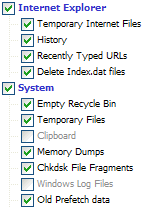
Download and install CCleaner[/i][/u]. When it has installed, in "Cleaner Settings", under the "Windows" tab, select the options shown below; nothing under the "Applications" tab should be checked at this time:
http://mvps.org/winhelp2002/cleaner.gif
(You may check Cookies, too, if you wish; I recommend you do so, but your call)

Next, click Options>Advanced

Uncheck: "Only delete files older than 48 hrs", then click to place a checkmark in "Show prompt to backup registry issues""

Return to Cleaner and click "Analyze". The analysis will take a few minutes, be patient. When it has completed, select "Run Cleaner" and confirm when prompted.

Now, Boot Into Safe Mode and run the Ad-Aware SE VX2Fix plugin. Follow that with a full-system scan-and clean with Ad-Aware SE, and follow that with a full system scan-and-clean with CCleaner. When that has been done, reboot into safe mode once more and repeat the entire VX2Cleaner, Ad-Aware SE, and CCleaner process. Do not reboot.

While still in safe mode, run a full system scan-and-clean with Ewido, and save the log.

Finally, while still in safe mode, run a full system scan-and-clean with Windows Defender

Now, reboot normally, but do not connect to the internet yet. While not connected to the internet, repeat the entire VX2Cleaner, Ad-Aware SE, and CCleaner process, as well as 1 more scan-clean-and-save-log runthrough with Ewido. Follow that with a fresh scan-and-save-log only with HJT.

Make sure your resident antivirus is enabled and running, connect to the internet, navigate back to this thread and post the 2 Ewido logs and the fresh HJT log.
0 Replies
 
Aremah
 
  1  
Reply Fri 24 Feb, 2006 04:43 pm
Hey, Timber. I felt like I'd be going in circles here, as I did most of that before, but I did what you wrote anyway.

The only things that were found were the two registry entries that AdAware found (that disable the Task Manager and Regedit) and a few tracking cookies that AdAware removed. The two entries did not reappear when rebooted to safe mode after the first round of scanning, but appeared again upon subsequent boot into normal mode.

As soon as I connected to the Internet to post the results, the pop-ups started coming up again. So yeah, going in circles.

I used Symantec and ActiveScan, as you can see. Ewido found nothing on either run, so I'm not posting the empty logs. Here's the HJT log:

Logfile of HijackThis v1.99.1
Scan saved at 23:30:08, on 2006-02-24
Platform: Windows XP Dodatek SP2 (WinNT 5.01.2600)
MSIE: Internet Explorer v6.00 SP2 (6.00.2900.2180)

Running processes:
C:\WINDOWS\System32\smss.exe
C:\WINDOWS\system32\winlogon.exe
C:\WINDOWS\system32\services.exe
C:\WINDOWS\system32\lsass.exe
C:\WINDOWS\System32\Ati2evxx.exe
C:\WINDOWS\system32\svchost.exe
C:\WINDOWS\System32\svchost.exe
C:\WINDOWS\system32\spoolsv.exe
C:\WINDOWS\system32\Ati2evxx.exe
C:\Program Files\Common Files\Symantec Shared\ccEvtMgr.exe
C:\WINDOWS\Explorer.EXE
C:\WINDOWS\System32\CTsvcCDA.exe
C:\Program Files\ewido anti-malware\ewidoctrl.exe
C:\Program Files\Norton SystemWorks\Norton AntiVirus\navapsvc.exe
C:\Program Files\Norton SystemWorks\Norton Utilities\NPROTECT.EXE
C:\PROGRA~1\NORTON~1\SPEEDD~1\nopdb.exe
C:\Program Files\Alcohol Soft\Alcohol 120\StarWind\StarWindService.exe
C:\WINDOWS\System32\svchost.exe
C:\WINDOWS\System32\MsPMSPSv.exe
C:\Program Files\Common Files\Symantec Shared\Security Center\SymWSC.exe
C:\Program Files\ATI Technologies\ATI.ACE\cli.exe
C:\Program Files\Logitech\iTouch\iTouch.exe
C:\Program Files\Common Files\Symantec Shared\ccApp.exe
C:\Program Files\Logitech\MouseWare\system\em_exec.exe
C:\WINDOWS\system32\CTHELPER.EXE
C:\Program Files\W-Update\Keygen.exe
C:\Program Files\ATI Technologies\ATI.ACE\cli.exe
C:\Program Files\Messenger\msmsgs.exe
C:\WINDOWS\system32\wscntfy.exe
C:\HJT\HijackThis.exe

R0 - HKCU\Software\Microsoft\Internet Explorer\Main,Start Page = http://www.google.pl/
R0 - HKCU\Software\Microsoft\Internet Explorer\Toolbar,LinksFolderName = Łącza
O2 - BHO: AcroIEHlprObj Class - {06849E9F-C8D7-4D59-B87D-784B7D6BE0B3} - C:\Program Files\Adobe\Acrobat 7.0\ActiveX\AcroIEHelper.dll
O2 - BHO: (no name) - {53707962-6F74-2D53-2644-206D7942484F} - C:\PROGRA~1\SPYBOT~1\SDHelper.dll
O2 - BHO: NAV Helper - {BDF3E430-B101-42AD-A544-FADC6B084872} - C:\Program Files\Norton SystemWorks\Norton AntiVirus\NavShExt.dll
O3 - Toolbar: Norton AntiVirus - {42CDD1BF-3FFB-4238-8AD1-7859DF00B1D6} - C:\Program Files\Norton SystemWorks\Norton AntiVirus\NavShExt.dll
O4 - HKLM\..\Run: [ATICCC] "C:\Program Files\ATI Technologies\ATI.ACE\cli.exe" runtime -Delay
O4 - HKLM\..\Run: [zBrowser Launcher] C:\Program Files\Logitech\iTouch\iTouch.exe
O4 - HKLM\..\Run: [Logitech Utility] Logi_MwX.Exe
O4 - HKLM\..\Run: [ccApp] "C:\Program Files\Common Files\Symantec Shared\ccApp.exe"
O4 - HKLM\..\Run: [ccRegVfy] "C:\Program Files\Common Files\Symantec Shared\ccRegVfy.exe"
O4 - HKLM\..\Run: [Symantec NetDriver Monitor] C:\PROGRA~1\SYMNET~1\SNDMon.exe /Consumer
O4 - HKLM\..\Run: [WINDVDPatch] CTHELPER.EXE
O4 - HKLM\..\Run: [UpdReg] C:\WINDOWS\UpdReg.EXE
O4 - HKLM\..\Run: [Jet Detection] "C:\Program Files\Creative\SBLive\PROGRAM\ADGJDet.exe"
O4 - HKLM\..\Run: [CTStartup] C:\Program Files\Creative\Splash Screen\CTEaxSpl.EXE /run
O4 - HKLM\..\Run: [QuickTime Task] "C:\Program Files\QuickTime\qttask.exe" -atboottime
O4 - HKLM\..\Run: [NeroFilterCheck] C:\WINDOWS\system32\NeroCheck.exe
O4 - HKLM\..\Run: [Keygen] C:\Program Files\W-Update\Keygen.exe
O4 - HKCU\..\Run: [LBConfig] C:\DOCUME~1\MARCIN~1\USTAWI~1\Temp\{9115E7DB-3B29-445A-802D-11E0AA945B7F}\LBConfig\Setup.exe /Config -s
O4 - HKCU\..\Run: [updateMgr] "C:\Program Files\Adobe\Acrobat 7.0\Reader\AdobeUpdateManager.exe" AcRdB7_0_7 -reboot 1
O4 - HKCU\..\Run: [RemoteCenter] C:\Program Files\Creative\SBLive\RemoteCenter\Rc\RcMan.EXE
O4 - Startup: Adobe Gamma.lnk = C:\Program Files\Common Files\Adobe\Calibration\Adobe Gamma Loader.exe
O4 - Global Startup: Adobe Reader Speed Launch.lnk = C:\Program Files\Adobe\Acrobat 7.0\Reader\reader_sl.exe
O9 - Extra button: Messenger - {FB5F1910-F110-11d2-BB9E-00C04F795683} - C:\Program Files\Messenger\msmsgs.exe
O9 - Extra 'Tools' menuitem: Windows Messenger - {FB5F1910-F110-11d2-BB9E-00C04F795683} - C:\Program Files\Messenger\msmsgs.exe
O16 - DPF: {0A5FD7C5-A45C-49FC-ADB5-9952547D5715} (Creative Software AutoUpdate) - http://creative.com/su/ocx/15015/CTSUEng.cab
O16 - DPF: {2BC66F54-93A8-11D3-BEB6-00105AA9B6AE} (Symantec AntiVirus scanner) - http://security.symantec.com/sscv6/SharedContent/vc/bin/AvSniff.cab
O16 - DPF: {6414512B-B978-451D-A0D8-FCFDF33E833C} (WUWebControl Class) - http://update.microsoft.com/windowsupdate/v6/V5Controls/en/x86/client/wuweb_site.cab?1140367969343
O16 - DPF: {644E432F-49D3-41A1-8DD5-E099162EEEC5} (Symantec RuFSI Utility Class) - http://security.symantec.com/sscv6/SharedContent/common/bin/cabsa.cab
O16 - DPF: {9A9307A0-7DA4-4DAF-B042-5009F29E09E1} (ActiveScan Installer Class) - http://acs.pandasoftware.com/activescan/as5free/asinst.cab
O16 - DPF: {F6ACF75C-C32C-447B-9BEF-46B766368D29} (Creative Software AutoUpdate Support Package) - http://creative.com/su/ocx/15016/CTPID.cab
O18 - Protocol: msnim - {828030A1-22C1-4009-854F-8E305202313F} - "C:\PROGRA~1\MSNMES~1\msgrapp.dll" (file missing)
O23 - Service: Adobe LM Service - Adobe Systems - C:\Program Files\Common Files\Adobe Systems Shared\Service\Adobelmsvc.exe
O23 - Service: Ati HotKey Poller - ATI Technologies Inc. - C:\WINDOWS\System32\Ati2evxx.exe
O23 - Service: ATI Smart - Unknown owner - C:\WINDOWS\system32\ati2sgag.exe
O23 - Service: Symantec Event Manager (ccEvtMgr) - Symantec Corporation - C:\Program Files\Common Files\Symantec Shared\ccEvtMgr.exe
O23 - Service: Symantec Password Validation Service (ccPwdSvc) - Symantec Corporation - C:\Program Files\Common Files\Symantec Shared\ccPwdSvc.exe
O23 - Service: Creative Service for CDROM Access - Creative Technology Ltd - C:\WINDOWS\System32\CTsvcCDA.exe
O23 - Service: ewido security suite control - ewido networks - C:\Program Files\ewido anti-malware\ewidoctrl.exe
O23 - Service: InstallDriver Table Manager (IDriverT) - Macrovision Corporation - C:\Program Files\Common Files\InstallShield\Driver\1050\Intel 32\IDriverT.exe
O23 - Service: Macromedia Licensing Service - Unknown owner - C:\Program Files\Common Files\Macromedia Shared\Service\Macromedia Licensing.exe
O23 - Service: Usługa Auto-Protect w programie Norton AntiVirus (navapsvc) - Symantec Corporation - C:\Program Files\Norton SystemWorks\Norton AntiVirus\navapsvc.exe
O23 - Service: Norton Unerase Protection (NProtectService) - Symantec Corporation - C:\Program Files\Norton SystemWorks\Norton Utilities\NPROTECT.EXE
O23 - Service: ScriptBlocking Service (SBService) - Symantec Corporation - C:\PROGRA~1\COMMON~1\SYMANT~1\SCRIPT~1\SBServ.exe
O23 - Service: Symantec Network Drivers Service (SNDSrvc) - Symantec Corporation - C:\Program Files\Common Files\Symantec Shared\SNDSrvc.exe
O23 - Service: Speed Disk service - Symantec Corporation - C:\PROGRA~1\NORTON~1\SPEEDD~1\nopdb.exe
O23 - Service: StarWind iSCSI Service (StarWindService) - Rocket Division Software - C:\Program Files\Alcohol Soft\Alcohol 120\StarWind\StarWindService.exe
O23 - Service: SymWMI Service (SymWSC) - Symantec Corporation - C:\Program Files\Common Files\Symantec Shared\Security Center\SymWSC.exe
0 Replies


Related Topics

Clone of Micosoft Office - Question by Advocate
Do You Turn Off Your Computer at Night? - Discussion by Phoenix32890
The "Death" of the Computer Mouse - Discussion by Phoenix32890
Windows 10... - Discussion by Region Philbis
Surface Pro 3: What do you think? - Question by neologist
Windows 8 tips thread - Discussion by Wilso
GOOGLE CHROME - Question by Setanta
.Net and Firefox... - Discussion by gungasnake
Hacking a computer and remote access - Discussion by trying2learn
 
  1. Forums
  2. » Pop-under advertising - very persistent
Copyright © 2025 MadLab, LLC :: Terms of Service :: Privacy Policy :: Page generated in 0.03 seconds on 12/29/2025 at 05:23:48