1
   

Pop-Ups


flier
 
Reply Sat 11 Feb, 2006 01:16 pm
I cannot get rid of several pop-up ads which appear as soon as I open Internet Explorer. I am running McAfee Security Center, Spyware Doctor, Meiya Popup Ad Filter and Ewido anti-Malware. I have tried several of the procedures on this forum but nothing seems to intercept these pop-ups. I have run Hi-Jack this and include the latest log file. If anyone can assist me I will be eternally grateful.

Logfile of HijackThis v1.99.1
Scan saved at 2:05:59 PM, on 2/11/2006
Platform: Windows XP SP2 (WinNT 5.01.2600)
MSIE: Internet Explorer v6.00 SP2 (6.00.2900.2180)

Running processes:
C:\WINDOWS\System32\smss.exe
C:\WINDOWS\system32\csrss.exe
C:\WINDOWS\system32\winlogon.exe
C:\WINDOWS\system32\services.exe
C:\WINDOWS\system32\lsass.exe
C:\WINDOWS\system32\Ati2evxx.exe
C:\WINDOWS\system32\svchost.exe
C:\WINDOWS\System32\svchost.exe
C:\Program Files\Intel\Wireless\Bin\EvtEng.exe
C:\Program Files\Intel\Wireless\Bin\S24EvMon.exe
C:\Program Files\Intel\Wireless\Bin\WLKeeper.exe
C:\WINDOWS\system32\svchost.exe
C:\WINDOWS\system32\spoolsv.exe
C:\Program Files\Intel\Wireless\Bin\ZcfgSvc.exe
C:\WINDOWS\system32\Ati2evxx.exe
C:\WINDOWS\Explorer.EXE
C:\Program Files\Intel\Wireless\Bin\ifrmewrk.exe
C:\Program Files\ATI Technologies\ATI Control Panel\atiptaxx.exe
C:\Program Files\Dell\QuickSet\quickset.exe
C:\PROGRA~1\mcafee.com\agent\mcagent.exe
C:\PROGRA~1\McAfee\SPAMKI~1\MskAgent.exe
C:\Program Files\McAfee.com\Personal Firewall\MPFTray.exe
C:\Program Files\McAfee.com\VSO\mcvsshld.exe
C:\PROGRA~1\Intel\Wireless\Bin\1XConfig.exe
C:\Program Files\McAfee.com\VSO\oasclnt.exe
C:\Program Files\Microsoft AntiSpyware\gcasServ.exe
c:\progra~1\mcafee.com\vso\mcvsescn.exe
C:\Program Files\Dell Support\DSAgnt.exe
C:\Program Files\Meaya\Popup Ad Filter\PopFilter.exe
C:\Program Files\Skype\Phone\Skype.exe
C:\PROGRA~1\MICROS~4\wcescomm.exe
C:\Program Files\Toshiba\Bluetooth Toshiba Stack\TosBtMng.exe
C:\Program Files\Digital Line Detect\DLG.exe
C:\Program Files\Toshiba\Bluetooth Toshiba Stack\TosA2dp.exe
C:\Program Files\Toshiba\Bluetooth Toshiba Stack\TosBtHsp.exe
C:\PROGRA~1\MICROS~4\rapimgr.exe
C:\PROGRA~1\COMMON~1\AOL\ACS\AOLacsd.exe
C:\Program Files\Executive Software\Diskeeper\DkService.exe
C:\WINDOWS\eHome\ehRecvr.exe
C:\Program Files\Microsoft AntiSpyware\gcasDtServ.exe
C:\WINDOWS\eHome\ehSched.exe
C:\Program Files\Toshiba\Bluetooth Toshiba Stack\tosOBEX.exe
C:\Program Files\ewido anti-malware\ewidoctrl.exe
C:\Program Files\ewido anti-malware\ewidoguard.exe
c:\program files\mcafee.com\agent\mcdetect.exe
c:\PROGRA~1\mcafee.com\vso\mcshield.exe
C:\Program Files\Toshiba\Bluetooth Toshiba Stack\tosBtProc.exe
c:\PROGRA~1\mcafee.com\agent\mctskshd.exe
C:\Program Files\Common Files\Microsoft Shared\VS7DEBUG\MDM.EXE
C:\PROGRA~1\McAfee.com\PERSON~1\MPFSERVICE.exe
C:\PROGRA~1\McAfee\SPAMKI~1\MSKSrvr.exe
C:\Program Files\Microsoft SQL Server\MSSQL$MICROSOFTBCM\Binn\sqlservr.exe
C:\Program Files\Dell\NICCONFIGSVC\NICCONFIGSVC.exe
C:\Program Files\Intel\Wireless\Bin\RegSrvc.exe
C:\Program Files\Common Files\Roxio Shared\SharedCOM8\RoxMediaDB.exe
C:\Program Files\Common Files\Roxio Shared\SharedCOM8\RoxWatch.exe
C:\Program Files\Spyware Doctor\sdhelp.exe
C:\WINDOWS\system32\svchost.exe
C:\WINDOWS\ehome\mcrdsvc.exe
C:\WINDOWS\system32\wbem\wmiprvse.exe
C:\WINDOWS\system32\dllhost.exe
C:\WINDOWS\System32\alg.exe
C:\PROGRA~1\McAfee.com\PERSON~1\MpfAgent.exe
C:\PROGRA~1\SPYWAR~1\swdoctor.exe
C:\Program Files\LimeWire\LimeWire.exe
C:\Program Files\Internet Explorer\iexplore.exe
C:\Documents and Settings\David D Mallin\Desktop\HijackThis.exe

R1 - HKCU\Software\Microsoft\Internet Explorer\Main,Default_Page_URL = http://www.dell4me.com/myway
O2 - BHO: McAfee AntiPhishing Filter - {41D68ED8-4CFF-4115-88A6-6EBB8AF19000} - c:\program files\mcafee\spamkiller\mcapfbho.dll
O2 - BHO: PCTools Site Guard - {5C8B2A36-3DB1-42A4-A3CB-D426709BBFEB} - C:\PROGRA~1\SPYWAR~1\tools\iesdsg.dll
O2 - BHO: AcroIEToolbarHelper Class - {AE7CD045-E861-484f-8273-0445EE161910} - C:\Program Files\Adobe\Acrobat 7.0\Acrobat\AcroIEFavClient.dll
O2 - BHO: PCTools Browser Monitor - {B56A7D7D-6927-48C8-A975-17DF180C71AC} - C:\PROGRA~1\SPYWAR~1\tools\iesdpb.dll
O3 - Toolbar: McAfee VirusScan - {BA52B914-B692-46c4-B683-905236F6F655} - c:\progra~1\mcafee.com\vso\mcvsshl.dll
O3 - Toolbar: &Google - {2318C2B1-4965-11d4-9B18-009027A5CD4F} - c:\program files\google\googletoolbar1.dll
O3 - Toolbar: Adobe PDF - {47833539-D0C5-4125-9FA8-0819E2EAAC93} - C:\Program Files\Adobe\Acrobat 7.0\Acrobat\AcroIEFavClient.dll
O4 - HKLM\..\Run: [IntelWireless] C:\Program Files\Intel\Wireless\Bin\ifrmewrk.exe /tf Intel PROSet/Wireless
O4 - HKLM\..\Run: [ATIPTA] "C:\Program Files\ATI Technologies\ATI Control Panel\atiptaxx.exe"
O4 - HKLM\..\Run: [Dell QuickSet] C:\Program Files\Dell\QuickSet\quickset.exe
O4 - HKLM\..\Run: [MCUpdateExe] c:\PROGRA~1\mcafee.com\agent\mcupdate.exe
O4 - HKLM\..\Run: [MCAgentExe] c:\PROGRA~1\mcafee.com\agent\mcagent.exe
O4 - HKLM\..\Run: [MSKAGENTEXE] C:\PROGRA~1\McAfee\SPAMKI~1\MskAgent.exe
O4 - HKLM\..\Run: [MPFEXE] "C:\Program Files\McAfee.com\Personal Firewall\MPFTray.exe"
O4 - HKLM\..\Run: [VSOCheckTask] "C:\PROGRA~1\McAfee.com\VSO\mcmnhdlr.exe" /checktask
O4 - HKLM\..\Run: [VirusScan Online] C:\Program Files\McAfee.com\VSO\mcvsshld.exe
O4 - HKLM\..\Run: [OASClnt] C:\Program Files\McAfee.com\VSO\oasclnt.exe
O4 - HKLM\..\Run: [DiskeeperSystray] "C:\Program Files\Executive Software\Diskeeper\DkIcon.exe"
O4 - HKLM\..\Run: [gcasServ] "C:\Program Files\Microsoft AntiSpyware\gcasServ.exe"
O4 - HKCU\..\Run: [DellSupport] "C:\Program Files\Dell Support\DSAgnt.exe" /startup
O4 - HKCU\..\Run: [Spyware Doctor] C:\PROGRA~1\SPYWAR~1\swdoctor.exe /Q
O4 - HKCU\..\Run: [Popup Ad Filter] C:\Program Files\Meaya\Popup Ad Filter\PopFilter.exe
O4 - HKCU\..\Run: [Skype] "C:\Program Files\Skype\Phone\Skype.exe" /nosplash /minimized
O4 - HKCU\..\Run: [H/PC Connection Agent] "C:\PROGRA~1\MICROS~4\wcescomm.exe"
O4 - Startup: Diskeeper 9 Professional Edition Registration.lnk = C:\Program Files\Executive Software\Diskeeper\ESIRegister.exe
O4 - Global Startup: Bluetooth Manager.lnk = ?
O4 - Global Startup: Digital Line Detect.lnk = ?
O8 - Extra context menu item: Convert link target to Adobe PDF - res://C:\Program Files\Adobe\Acrobat 7.0\Acrobat\AcroIEFavClient.dll/AcroIECapture.html
O8 - Extra context menu item: Convert link target to existing PDF - res://C:\Program Files\Adobe\Acrobat 7.0\Acrobat\AcroIEFavClient.dll/AcroIEAppend.html
O8 - Extra context menu item: Convert selected links to Adobe PDF - res://C:\Program Files\Adobe\Acrobat 7.0\Acrobat\AcroIEFavClient.dll/AcroIECaptureSelLinks.html
O8 - Extra context menu item: Convert selected links to existing PDF - res://C:\Program Files\Adobe\Acrobat 7.0\Acrobat\AcroIEFavClient.dll/AcroIEAppendSelLinks.html
O8 - Extra context menu item: Convert selection to Adobe PDF - res://C:\Program Files\Adobe\Acrobat 7.0\Acrobat\AcroIEFavClient.dll/AcroIECapture.html
O8 - Extra context menu item: Convert selection to existing PDF - res://C:\Program Files\Adobe\Acrobat 7.0\Acrobat\AcroIEFavClient.dll/AcroIEAppend.html
O8 - Extra context menu item: Convert to Adobe PDF - res://C:\Program Files\Adobe\Acrobat 7.0\Acrobat\AcroIEFavClient.dll/AcroIECapture.html
O8 - Extra context menu item: Convert to existing PDF - res://C:\Program Files\Adobe\Acrobat 7.0\Acrobat\AcroIEFavClient.dll/AcroIEAppend.html
O9 - Extra button: Spyware Doctor - {2D663D1A-8670-49D9-A1A5-4C56B4E14E84} - C:\PROGRA~1\SPYWAR~1\tools\iesdpb.dll
O9 - Extra button: Create Mobile Favorite - {2EAF5BB1-070F-11D3-9307-00C04FAE2D4F} - C:\PROGRA~1\MICROS~4\INetRepl.dll
O9 - Extra button: (no name) - {2EAF5BB2-070F-11D3-9307-00C04FAE2D4F} - C:\PROGRA~1\MICROS~4\INetRepl.dll
O9 - Extra 'Tools' menuitem: Create Mobile Favorite... - {2EAF5BB2-070F-11D3-9307-00C04FAE2D4F} - C:\PROGRA~1\MICROS~4\INetRepl.dll
O9 - Extra button: (no name) - {39FD89BF-D3F1-45b6-BB56-3582CCF489E1} - c:\program files\mcafee\spamkiller\mcapfbho.dll
O9 - Extra 'Tools' menuitem: McAfee AntiPhishing Filter - {39FD89BF-D3F1-45b6-BB56-3582CCF489E1} - c:\program files\mcafee\spamkiller\mcapfbho.dll
O12 - Plugin for .pdf: C:\Program Files\Internet Explorer\PLUGINS\nppdf32.dll
O16 - DPF: {17492023-C23A-453E-A040-C7C580BBF700} (Windows Genuine Advantage Validation Tool) - http://go.microsoft.com/fwlink/?linkid=48835
O20 - AppInit_DLLs: C:\PROGRA~1\Google\GOOGLE~1\GOEC62~1.DLL
O20 - Winlogon Notify: IntelWireless - C:\Program Files\Intel\Wireless\Bin\LgNotify.dll
O23 - Service: Adobe LM Service - Adobe Systems - C:\Program Files\Common Files\Adobe Systems Shared\Service\Adobelmsvc.exe
O23 - Service: AOL Connectivity Service (AOL ACS) - America Online, Inc. - C:\PROGRA~1\COMMON~1\AOL\ACS\AOLacsd.exe
O23 - Service: Ati HotKey Poller - ATI Technologies Inc. - C:\WINDOWS\system32\Ati2evxx.exe
O23 - Service: Diskeeper - Executive Software International, Inc. - C:\Program Files\Executive Software\Diskeeper\DkService.exe
O23 - Service: EvtEng - Intel Corporation - C:\Program Files\Intel\Wireless\Bin\EvtEng.exe
O23 - Service: ewido security suite control - ewido networks - C:\Program Files\ewido anti-malware\ewidoctrl.exe
O23 - Service: ewido security suite guard - ewido networks - C:\Program Files\ewido anti-malware\ewidoguard.exe
O23 - Service: InstallDriver Table Manager (IDriverT) - Macrovision Corporation - C:\Program Files\Common Files\InstallShield\Driver\1050\Intel 32\IDriverT.exe
O23 - Service: McAfee WSC Integration (McDetect.exe) - McAfee, Inc - c:\program files\mcafee.com\agent\mcdetect.exe
O23 - Service: McAfee.com McShield (McShield) - McAfee Inc. - c:\PROGRA~1\mcafee.com\vso\mcshield.exe
O23 - Service: McAfee Task Scheduler (McTskshd.exe) - McAfee, Inc - c:\PROGRA~1\mcafee.com\agent\mctskshd.exe
O23 - Service: McAfee SecurityCenter Update Manager (mcupdmgr.exe) - McAfee, Inc - C:\PROGRA~1\McAfee.com\Agent\mcupdmgr.exe
O23 - Service: McAfee Personal Firewall Service (MpfService) - McAfee Corporation - C:\PROGRA~1\McAfee.com\PERSON~1\MPFSERVICE.exe
O23 - Service: McAfee SpamKiller Server (MskService) - McAfee Inc. - C:\PROGRA~1\McAfee\SPAMKI~1\MSKSrvr.exe
O23 - Service: NICCONFIGSVC - Dell Inc. - C:\Program Files\Dell\NICCONFIGSVC\NICCONFIGSVC.exe
O23 - Service: RegSrvc - Intel Corporation - C:\Program Files\Intel\Wireless\Bin\RegSrvc.exe
O23 - Service: LiveShare P2P Server (RoxLiveShare) - Sonic Solutions - C:\Program Files\Common Files\Roxio Shared\SharedCOM8\RoxLiveShare.exe
O23 - Service: RoxMediaDB - Sonic Solutions - C:\Program Files\Common Files\Roxio Shared\SharedCOM8\RoxMediaDB.exe
O23 - Service: RoxUpnpRenderer (RoxUPnPRenderer) - Sonic Solutions - C:\Program Files\Common Files\Roxio Shared\SharedCom\RoxUpnpRenderer.exe
O23 - Service: RoxUpnpServer - Sonic Solutions - C:\Program Files\Roxio\Easy Media Creator 8\Digital Home\RoxUpnpServer.exe
O23 - Service: Roxio Hard Drive Watcher (RoxWatch) - Sonic Solutions - C:\Program Files\Common Files\Roxio Shared\SharedCOM8\RoxWatch.exe
O23 - Service: Spectrum24 Event Monitor (S24EventMonitor) - Intel Corporation - C:\Program Files\Intel\Wireless\Bin\S24EvMon.exe
O23 - Service: PC Tools Spyware Doctor (SDhelper) - PC Tools - C:\Program Files\Spyware Doctor\sdhelp.exe
O23 - Service: WLANKEEPER - Intel® Corporation - C:\Program Files\Intel\Wireless\Bin\WLKeeper.exe
  • Topic Stats
  • Top Replies
  • Link to this Topic
Type: Discussion • Score: 1 • Views: 856 • Replies: 5
No top replies

 
mans
 
  1  
Reply Tue 21 Feb, 2006 02:38 am
sometimes mail may be recieved, which isn't deleted. it is possible - perhaps you clicked on it by accident, or clicked on an fake internet ad or link or something.
0 Replies
 
timberlandko
 
  1  
Reply Tue 21 Feb, 2006 10:59 am
flier, lets see what we can do here.

Print out these instructions, and don't do anything without fully understanding how to step through this proceedure. If you're unsure of anything, ask first.

First, get HiJackThis properly installed; it belongs in a dedicated folder of its own either in your Programs folder on directly on your root drive, not running from a desktop folder as you currently have it configured. I suggest you delete your current copy of HJT, then download HJTsetup.exe
  • Save HJTsetup.exe to your desktop.
  • Locate and doubleclick the HJTsetup.exe icon on your desktop.
  • HiJackThis will be installed to C:\Program Files\HijackThis.
  • Continue to click Run/Next in the setup dialogues until you reach the Select Additional Tasks dialogue.
  • Put a check by Create a desktop icon then click Next again.
  • Continue to follow the rest of the prompts from there.
  • At the final dialogue, click "Finish", which will launch HijackThis.
You will be presented with the New User's Quickstart control panel for HJT. Under "What would you like to do?", click the 4th option, "Open the Misc Tools section". There, place a checkmark in the "List also minor sections (full)" box, then click ""Generate Startuplist log". When prompted, confirm that you wish to generate a Startup log. In a few moments, a Notepad textfile will appear; from the Notepad tool bar, select "File", then select "Save". This will save the report to HJT's folder, "C:\Program Files\HijackThis". When that has been done, close HJT.

Configure Windows Explorer to Show All Files

Using Add/Remove Programs" (Start>Settings>Control Panel>Add/Remove Programs), uninstall both Limewire and Meaya. When you have uninstalled both, locate their folders, which should be in C:\Program Files, and delete them. Also, uninstall your version of Microsoft Antispyware Beta; it has been supplanted by Windows Defender (Beta 2), which you should now download and install. Read, understand, and follow the How To Setup page. When Windows Defender has installed, it will update and run a scan. Let it go to completion, then close it.

Next, go to Windows Update and make certain there are no outstanding Service Packs or high-priority updates for your operating system and/or Internet Explorer.

Run the Microsoft Windows Malicious Software Removal Tool.


You already have Ewido Security Suite installed; launch it, update it, and run a scan with it, saving the log to someplace you can find it later.

Download CWShredder, and unzip it to your desktop, but don't run it yet.

Go to Trend Micro Housecall. With your own resident antivirus and antispyware applications disabled, as well as any ad-blocking or popup blockers disabled, run the free online scan-and-clean process. If when it has completed, it tells you it located but could not clean anything, make and save careful note of the EXACT message, including the full path to any files listed.

Next, go to Panda Free Online Scan, and again with any resident antivirus, antispyware,ad-blocking, or popup stopping software disabled, run the free online scan-and-clean process. When it has completed, it will generate a report log as a Notepad text file; be sure to save that log to someplace you will be able to find it later.

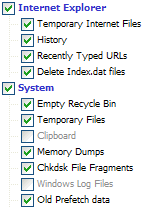
Download and install CCleaner[/i][/u]. When it has installed, in "Cleaner Settings", under the "Windows"
select the options shown below; nothing under the "Applications" tab should be checked at this time:
http://mvps.org/winhelp2002/cleaner.gif
(You may check Cookies, too, if you wish.)

Next, click Options>Advanced

Uncheck: "Only delete files older than 48 hrs", then click to place a checkmark in "Show prompt to backup registry issues""

Return to Cleaner and click "Analyze". The analysis will take a few minutes, be patient. When it has completed, select "Run Cleaner" and confirm when prompted.

Next, Boot Into Safe Mode.

Once booted into safemode, locate and launch CWShredder, selecting "Fix". When it has completed, do not reboot.

Locate and launch Ewido; run a full-system scan-and-clean, saving the log file. Do not reboot.

Locate and launch Windows Defender, and run a full system scan-and-clean with it. Do not reboot.

Locate and launch CCleaner, and perform a full scan and clean operation as before. When that has completed, reboot normally, BUT DO NOT CONNECT TO THE INTERNET.

When your machine has rebooted, locate and launch Ewido, run another scan-and-clean, saving the log.

When that has been done, locate and launch HiJackThis, and run a Scan-and-Save-Log only, "Fixing" nothing.

When that has been completed, be sure your resident anitvirus, antispyware, adblocker and popupstoppers have been re-enabled, then connect to the internet, navigate back to this thread and post the 2 Ewido logs, the Panda ActiveScan log, any report resulting from TrendMicro Housecall, and the latest HJT log, along with the saved Startup list (both of which should be found in the "C:\Program Files\HijackThis" folder).

You might find it convenient to click "Turn on email updates" down at the bottom right of this page; doing so will cause a notification to be sent to the address you used when you registered with A2K whenever a reply is posted to this thread.
0 Replies
 
flier
 
  1  
Reply Tue 21 Feb, 2006 09:43 pm
Here is the result of the suggested procedure. I still have my "search inqwire" popuIncident Status Location Panda Report

Adware:adware/wupd Not disinfected C:\PROGRAM FILES\MediaGateway
Adware:adware/cws Not disinfected Windows Registry
Potentially unwanted tool:application/myway Not disinfected HKEY_CLASSES_ROOT\MYWAYSEARCHASSISTANTDE.AUXILIARY
Adware:adware/powerscan Not disinfected Windows Registry
Spyware:Cookie/YieldManager Not disinfected C:\Documents and Settings\David D Mallin\Cookies\david d [email protected][2].txt
Spyware:Cookie/Hbmediapro Not disinfected C:\Documents and Settings\David D Mallin\Cookies\david d [email protected][2].txt
Spyware:Cookie/BurstNet Not disinfected C:\Documents and Settings\David D Mallin\Cookies\david d mallin@burstnet[2].txt
Spyware:Cookie/Reliablestats Not disinfected C:\Documents and Settings\David D Mallin\Cookies\david d [email protected][2].txt
Spyware:Cookie/myaffiliateprogram Not disinfected C:\Documents and Settings\David D Mallin\Cookies\david d [email protected][1].txt
Spyware:Cookie/YieldManager Not disinfected C:\Documents and Settings\David D Mallin\Cookies\david d [email protected][2].txt
Spyware:Cookie/Hbmediapro Not disinfected C:\Documents and Settings\David D Mallin\Cookies\david d [email protected][2].txt
Spyware:Cookie/BurstNet Not disinfected C:\Documents and Settings\David D Mallin\Cookies\david d mallin@burstnet[2].txt
Spyware:Cookie/Reliablestats Not disinfected C:\Documents and Settings\David D Mallin\Cookies\david d [email protected][2].txt
Spyware:Cookie/myaffiliateprogram Not disinfected C:\Documents and Settings\David D Mallin\Cookies\david d [email protected][1].txt
Spyware:Cookie/WinFixer Not disinfected C:\~JTrg.000\Documents and Settings\David D Mallin\Cookies\david d mallin@winfixer[2].txt
ps

---------------------------------------------------------
ewido anti-malware - Scan report
---------------------------------------------------------

+ Created on: 10:31:44 PM, 2/21/2006
+ Report-Checksum: 28C31D42

+ Scan result:

No infected objects found.


::Report End

Logfile of HijackThis v1.99.1
Scan saved at 10:34:36 PM, on 2/21/2006
Platform: Windows XP SP2 (WinNT 5.01.2600)
MSIE: Internet Explorer v6.00 SP2 (6.00.2900.2180)

Running processes:
C:\WINDOWS\System32\smss.exe
C:\WINDOWS\system32\csrss.exe
C:\WINDOWS\system32\winlogon.exe
C:\WINDOWS\system32\services.exe
C:\WINDOWS\system32\lsass.exe
C:\WINDOWS\system32\Ati2evxx.exe
C:\WINDOWS\system32\svchost.exe
C:\Program Files\Windows Defender\MsMpEng.exe
C:\WINDOWS\System32\svchost.exe
C:\Program Files\Intel\Wireless\Bin\EvtEng.exe
C:\Program Files\Intel\Wireless\Bin\S24EvMon.exe
C:\Program Files\Intel\Wireless\Bin\WLKeeper.exe
C:\WINDOWS\system32\svchost.exe
C:\WINDOWS\system32\spoolsv.exe
C:\Program Files\Intel\Wireless\Bin\ZcfgSvc.exe
C:\WINDOWS\system32\Ati2evxx.exe
C:\WINDOWS\Explorer.EXE
C:\Program Files\Intel\Wireless\Bin\ifrmewrk.exe
C:\Program Files\ATI Technologies\ATI Control Panel\atiptaxx.exe
C:\Program Files\Dell\QuickSet\quickset.exe
C:\PROGRA~1\mcafee.com\agent\mcagent.exe
C:\PROGRA~1\McAfee\SPAMKI~1\MskAgent.exe
C:\Program Files\McAfee.com\Personal Firewall\MPFTray.exe
C:\Program Files\McAfee.com\VSO\mcvsshld.exe
C:\PROGRA~1\Intel\Wireless\Bin\1XConfig.exe
C:\Program Files\McAfee.com\VSO\oasclnt.exe
c:\progra~1\mcafee.com\vso\mcvsescn.exe
C:\Program Files\Windows Defender\MSASCui.exe
C:\Program Files\Dell Support\DSAgnt.exe
C:\PROGRA~1\SPYWAR~1\swdoctor.exe
C:\Program Files\Skype\Phone\Skype.exe
C:\Program Files\Microsoft ActiveSync\wcescomm.exe
C:\Program Files\Toshiba\Bluetooth Toshiba Stack\TosBtMng.exe
C:\Program Files\Digital Line Detect\DLG.exe
C:\PROGRA~1\MICROS~4\rapimgr.exe
C:\PROGRA~1\COMMON~1\AOL\ACS\AOLacsd.exe
C:\Program Files\Executive Software\Diskeeper\DkService.exe
C:\Program Files\Toshiba\Bluetooth Toshiba Stack\TosA2dp.exe
C:\WINDOWS\eHome\ehRecvr.exe
C:\WINDOWS\eHome\ehSched.exe
C:\Program Files\Toshiba\Bluetooth Toshiba Stack\TosBtHsp.exe
C:\Program Files\ewido anti-malware\ewidoctrl.exe
C:\Program Files\ewido anti-malware\ewidoguard.exe
c:\program files\mcafee.com\agent\mcdetect.exe
c:\PROGRA~1\mcafee.com\vso\mcshield.exe
c:\PROGRA~1\mcafee.com\agent\mctskshd.exe
C:\PROGRA~1\McAfee.com\Agent\mcupdmgr.exe
C:\Program Files\Toshiba\Bluetooth Toshiba Stack\tosOBEX.exe
C:\Program Files\Common Files\Microsoft Shared\VS7DEBUG\MDM.EXE
C:\PROGRA~1\McAfee.com\PERSON~1\MPFSERVICE.exe
C:\PROGRA~1\McAfee\SPAMKI~1\MSKSrvr.exe
C:\Program Files\Toshiba\Bluetooth Toshiba Stack\tosBtProc.exe
C:\Program Files\Microsoft SQL Server\MSSQL$MICROSOFTBCM\Binn\sqlservr.exe
C:\Program Files\Dell\NICCONFIGSVC\NICCONFIGSVC.exe
C:\Program Files\Intel\Wireless\Bin\RegSrvc.exe
C:\Program Files\Common Files\Roxio Shared\SharedCOM8\RoxMediaDB.exe
C:\Program Files\Common Files\Roxio Shared\SharedCOM8\RoxWatch.exe
C:\Program Files\Spyware Doctor\sdhelp.exe
C:\WINDOWS\system32\svchost.exe
C:\WINDOWS\ehome\mcrdsvc.exe
C:\WINDOWS\system32\dllhost.exe
C:\PROGRA~1\McAfee.com\PERSON~1\MpfAgent.exe
C:\PROGRA~1\McAfee.com\Agent\mcupdui.exe
C:\WINDOWS\System32\alg.exe
C:\WINDOWS\system32\wbem\wmiprvse.exe
C:\Program Files\Hijackthis\HijackThis.exe

R1 - HKCU\Software\Microsoft\Internet Explorer\Main,Default_Page_URL = http://www.dell4me.com/myway
O2 - BHO: McAfee AntiPhishing Filter - {41D68ED8-4CFF-4115-88A6-6EBB8AF19000} - c:\program files\mcafee\spamkiller\mcapfbho.dll
O2 - BHO: PCTools Site Guard - {5C8B2A36-3DB1-42A4-A3CB-D426709BBFEB} - C:\PROGRA~1\SPYWAR~1\tools\iesdsg.dll
O2 - BHO: AcroIEToolbarHelper Class - {AE7CD045-E861-484f-8273-0445EE161910} - C:\Program Files\Adobe\Acrobat 7.0\Acrobat\AcroIEFavClient.dll
O2 - BHO: PCTools Browser Monitor - {B56A7D7D-6927-48C8-A975-17DF180C71AC} - C:\PROGRA~1\SPYWAR~1\tools\iesdpb.dll
O3 - Toolbar: McAfee VirusScan - {BA52B914-B692-46c4-B683-905236F6F655} - c:\progra~1\mcafee.com\vso\mcvsshl.dll
O3 - Toolbar: &Google - {2318C2B1-4965-11d4-9B18-009027A5CD4F} - c:\program files\google\googletoolbar1.dll
O3 - Toolbar: Adobe PDF - {47833539-D0C5-4125-9FA8-0819E2EAAC93} - C:\Program Files\Adobe\Acrobat 7.0\Acrobat\AcroIEFavClient.dll
O4 - HKLM\..\Run: [IntelWireless] C:\Program Files\Intel\Wireless\Bin\ifrmewrk.exe /tf Intel PROSet/Wireless
O4 - HKLM\..\Run: [ATIPTA] "C:\Program Files\ATI Technologies\ATI Control Panel\atiptaxx.exe"
O4 - HKLM\..\Run: [Dell QuickSet] C:\Program Files\Dell\QuickSet\quickset.exe
O4 - HKLM\..\Run: [MCUpdateExe] C:\PROGRA~1\mcafee.com\agent\mcupdate.exe
O4 - HKLM\..\Run: [MCAgentExe] c:\PROGRA~1\mcafee.com\agent\mcagent.exe
O4 - HKLM\..\Run: [MSKAGENTEXE] C:\PROGRA~1\McAfee\SPAMKI~1\MskAgent.exe
O4 - HKLM\..\Run: [MPFEXE] "C:\Program Files\McAfee.com\Personal Firewall\MPFTray.exe"
O4 - HKLM\..\Run: [VSOCheckTask] "C:\PROGRA~1\McAfee.com\VSO\mcmnhdlr.exe" /checktask
O4 - HKLM\..\Run: [VirusScan Online] C:\Program Files\McAfee.com\VSO\mcvsshld.exe
O4 - HKLM\..\Run: [OASClnt] C:\Program Files\McAfee.com\VSO\oasclnt.exe
O4 - HKLM\..\Run: [DiskeeperSystray] "C:\Program Files\Executive Software\Diskeeper\DkIcon.exe"
O4 - HKLM\..\Run: [Windows Defender] "C:\Program Files\Windows Defender\MSASCui.exe" -hide
O4 - HKCU\..\Run: [DellSupport] "C:\Program Files\Dell Support\DSAgnt.exe" /startup
O4 - HKCU\..\Run: [Spyware Doctor] C:\PROGRA~1\SPYWAR~1\swdoctor.exe /Q
O4 - HKCU\..\Run: [Skype] "C:\Program Files\Skype\Phone\Skype.exe" /nosplash /minimized
O4 - HKCU\..\Run: [H/PC Connection Agent] "C:\Program Files\Microsoft ActiveSync\wcescomm.exe"
O4 - Global Startup: Bluetooth Manager.lnk = ?
O4 - Global Startup: Digital Line Detect.lnk = ?
O8 - Extra context menu item: Convert link target to Adobe PDF - res://C:\Program Files\Adobe\Acrobat 7.0\Acrobat\AcroIEFavClient.dll/AcroIECapture.html
O8 - Extra context menu item: Convert link target to existing PDF - res://C:\Program Files\Adobe\Acrobat 7.0\Acrobat\AcroIEFavClient.dll/AcroIEAppend.html
O8 - Extra context menu item: Convert selected links to Adobe PDF - res://C:\Program Files\Adobe\Acrobat 7.0\Acrobat\AcroIEFavClient.dll/AcroIECaptureSelLinks.html
O8 - Extra context menu item: Convert selected links to existing PDF - res://C:\Program Files\Adobe\Acrobat 7.0\Acrobat\AcroIEFavClient.dll/AcroIEAppendSelLinks.html
O8 - Extra context menu item: Convert selection to Adobe PDF - res://C:\Program Files\Adobe\Acrobat 7.0\Acrobat\AcroIEFavClient.dll/AcroIECapture.html
O8 - Extra context menu item: Convert selection to existing PDF - res://C:\Program Files\Adobe\Acrobat 7.0\Acrobat\AcroIEFavClient.dll/AcroIEAppend.html
O8 - Extra context menu item: Convert to Adobe PDF - res://C:\Program Files\Adobe\Acrobat 7.0\Acrobat\AcroIEFavClient.dll/AcroIECapture.html
O8 - Extra context menu item: Convert to existing PDF - res://C:\Program Files\Adobe\Acrobat 7.0\Acrobat\AcroIEFavClient.dll/AcroIEAppend.html
O9 - Extra button: Spyware Doctor - {2D663D1A-8670-49D9-A1A5-4C56B4E14E84} - C:\PROGRA~1\SPYWAR~1\tools\iesdpb.dll
O9 - Extra button: Create Mobile Favorite - {2EAF5BB1-070F-11D3-9307-00C04FAE2D4F} - C:\PROGRA~1\MICROS~4\INetRepl.dll
O9 - Extra button: (no name) - {2EAF5BB2-070F-11D3-9307-00C04FAE2D4F} - C:\PROGRA~1\MICROS~4\INetRepl.dll
O9 - Extra 'Tools' menuitem: Create Mobile Favorite... - {2EAF5BB2-070F-11D3-9307-00C04FAE2D4F} - C:\PROGRA~1\MICROS~4\INetRepl.dll
O9 - Extra button: (no name) - {39FD89BF-D3F1-45b6-BB56-3582CCF489E1} - c:\program files\mcafee\spamkiller\mcapfbho.dll
O9 - Extra 'Tools' menuitem: McAfee AntiPhishing Filter - {39FD89BF-D3F1-45b6-BB56-3582CCF489E1} - c:\program files\mcafee\spamkiller\mcapfbho.dll
O12 - Plugin for .pdf: C:\Program Files\Internet Explorer\PLUGINS\nppdf32.dll
O16 - DPF: {17492023-C23A-453E-A040-C7C580BBF700} (Windows Genuine Advantage Validation Tool) - http://go.microsoft.com/fwlink/?linkid=48835
O16 - DPF: {9A9307A0-7DA4-4DAF-B042-5009F29E09E1} (ActiveScan Installer Class) - http://acs.pandasoftware.com/activescan/as5free/asinst.cab
O20 - AppInit_DLLs: C:\PROGRA~1\Google\GOOGLE~1\GOEC62~1.DLL
O20 - Winlogon Notify: IntelWireless - C:\Program Files\Intel\Wireless\Bin\LgNotify.dll
O23 - Service: Adobe LM Service - Adobe Systems - C:\Program Files\Common Files\Adobe Systems Shared\Service\Adobelmsvc.exe
O23 - Service: AOL Connectivity Service (AOL ACS) - America Online, Inc. - C:\PROGRA~1\COMMON~1\AOL\ACS\AOLacsd.exe
O23 - Service: Ati HotKey Poller - ATI Technologies Inc. - C:\WINDOWS\system32\Ati2evxx.exe
O23 - Service: Diskeeper - Executive Software International, Inc. - C:\Program Files\Executive Software\Diskeeper\DkService.exe
O23 - Service: EvtEng - Intel Corporation - C:\Program Files\Intel\Wireless\Bin\EvtEng.exe
O23 - Service: ewido security suite control - ewido networks - C:\Program Files\ewido anti-malware\ewidoctrl.exe
O23 - Service: ewido security suite guard - ewido networks - C:\Program Files\ewido anti-malware\ewidoguard.exe
O23 - Service: InstallDriver Table Manager (IDriverT) - Macrovision Corporation - C:\Program Files\Common Files\InstallShield\Driver\1050\Intel 32\IDriverT.exe
O23 - Service: McAfee WSC Integration (McDetect.exe) - McAfee, Inc - c:\program files\mcafee.com\agent\mcdetect.exe
O23 - Service: McAfee.com McShield (McShield) - McAfee Inc. - c:\PROGRA~1\mcafee.com\vso\mcshield.exe
O23 - Service: McAfee Task Scheduler (McTskshd.exe) - McAfee, Inc - c:\PROGRA~1\mcafee.com\agent\mctskshd.exe
O23 - Service: McAfee SecurityCenter Update Manager (mcupdmgr.exe) - McAfee, Inc - C:\PROGRA~1\McAfee.com\Agent\mcupdmgr.exe
O23 - Service: McAfee Personal Firewall Service (MpfService) - McAfee Corporation - C:\PROGRA~1\McAfee.com\PERSON~1\MPFSERVICE.exe
O23 - Service: McAfee SpamKiller Server (MskService) - McAfee Inc. - C:\PROGRA~1\McAfee\SPAMKI~1\MSKSrvr.exe
O23 - Service: NICCONFIGSVC - Dell Inc. - C:\Program Files\Dell\NICCONFIGSVC\NICCONFIGSVC.exe
O23 - Service: RegSrvc - Intel Corporation - C:\Program Files\Intel\Wireless\Bin\RegSrvc.exe
O23 - Service: LiveShare P2P Server (RoxLiveShare) - Sonic Solutions - C:\Program Files\Common Files\Roxio Shared\SharedCOM8\RoxLiveShare.exe
O23 - Service: RoxMediaDB - Sonic Solutions - C:\Program Files\Common Files\Roxio Shared\SharedCOM8\RoxMediaDB.exe
O23 - Service: RoxUpnpRenderer (RoxUPnPRenderer) - Sonic Solutions - C:\Program Files\Common Files\Roxio Shared\SharedCom\RoxUpnpRenderer.exe
O23 - Service: RoxUpnpServer - Sonic Solutions - C:\Program Files\Roxio\Easy Media Creator 8\Digital Home\RoxUpnpServer.exe
O23 - Service: Roxio Hard Drive Watcher (RoxWatch) - Sonic Solutions - C:\Program Files\Common Files\Roxio Shared\SharedCOM8\RoxWatch.exe
O23 - Service: Spectrum24 Event Monitor (S24EventMonitor) - Intel Corporation - C:\Program Files\Intel\Wireless\Bin\S24EvMon.exe
O23 - Service: PC Tools Spyware Doctor (SDhelper) - PC Tools - C:\Program Files\Spyware Doctor\sdhelp.exe
O23 - Service: WLANKEEPER - Intel® Corporation - C:\Program Files\Intel\Wireless\Bin\WLKeeper.exe


StartupList report, 2/21/2006, 4:21:00 PM
StartupList version: 1.52.2
Started from : C:\Program Files\Hijackthis\HijackThis.EXE
Detected: Windows XP SP2 (WinNT 5.01.2600)
Detected: Internet Explorer v6.00 SP2 (6.00.2900.2180)
* Using default options
* Showing rarely important sections
==================================================

Running processes:

C:\WINDOWS\System32\smss.exe
C:\WINDOWS\system32\csrss.exe
C:\WINDOWS\system32\winlogon.exe
C:\WINDOWS\system32\services.exe
C:\WINDOWS\system32\lsass.exe
C:\WINDOWS\system32\Ati2evxx.exe
C:\WINDOWS\system32\svchost.exe
C:\WINDOWS\System32\svchost.exe
C:\Program Files\Intel\Wireless\Bin\EvtEng.exe
C:\Program Files\Intel\Wireless\Bin\S24EvMon.exe
C:\Program Files\Intel\Wireless\Bin\WLKeeper.exe
C:\WINDOWS\system32\svchost.exe
C:\WINDOWS\system32\spoolsv.exe
C:\Program Files\Intel\Wireless\Bin\ZcfgSvc.exe
C:\WINDOWS\system32\Ati2evxx.exe
C:\WINDOWS\Explorer.EXE
C:\Program Files\Intel\Wireless\Bin\ifrmewrk.exe
C:\Program Files\ATI Technologies\ATI Control Panel\atiptaxx.exe
C:\Program Files\Dell\QuickSet\quickset.exe
C:\PROGRA~1\mcafee.com\agent\mcagent.exe
C:\PROGRA~1\McAfee\SPAMKI~1\MskAgent.exe
C:\PROGRA~1\Intel\Wireless\Bin\1XConfig.exe
C:\Program Files\McAfee.com\Personal Firewall\MPFTray.exe
C:\Program Files\McAfee.com\VSO\mcvsshld.exe
C:\Program Files\McAfee.com\VSO\oasclnt.exe
C:\Program Files\Microsoft AntiSpyware\gcasServ.exe
c:\progra~1\mcafee.com\vso\mcvsescn.exe
C:\Program Files\Dell Support\DSAgnt.exe
C:\PROGRA~1\COMMON~1\AOL\ACS\AOLacsd.exe
C:\PROGRA~1\SPYWAR~1\swdoctor.exe
C:\Program Files\Meaya\Popup Ad Filter\PopFilter.exe
C:\Program Files\Executive Software\Diskeeper\DkService.exe
C:\WINDOWS\eHome\ehRecvr.exe
C:\WINDOWS\eHome\ehSched.exe
C:\Program Files\Microsoft ActiveSync\wcescomm.exe
C:\Program Files\ewido anti-malware\ewidoctrl.exe
C:\Program Files\ewido anti-malware\ewidoguard.exe
C:\PROGRA~1\MICROS~4\rapimgr.exe
c:\program files\mcafee.com\agent\mcdetect.exe
C:\Program Files\Toshiba\Bluetooth Toshiba Stack\TosBtMng.exe
C:\Program Files\Digital Line Detect\DLG.exe
c:\PROGRA~1\mcafee.com\vso\mcshield.exe
C:\Program Files\Toshiba\Bluetooth Toshiba Stack\TosA2dp.exe
C:\Program Files\Toshiba\Bluetooth Toshiba Stack\TosBtHsp.exe
c:\PROGRA~1\mcafee.com\agent\mctskshd.exe
C:\Program Files\Common Files\Microsoft Shared\VS7DEBUG\MDM.EXE
C:\PROGRA~1\McAfee.com\PERSON~1\MPFSERVICE.exe
C:\Program Files\Toshiba\Bluetooth Toshiba Stack\tosOBEX.exe
C:\Program Files\Microsoft AntiSpyware\gcasDtServ.exe
C:\Program Files\Toshiba\Bluetooth Toshiba Stack\tosBtProc.exe
C:\Program Files\Microsoft SQL Server\MSSQL$MICROSOFTBCM\Binn\sqlservr.exe
C:\Program Files\Dell\NICCONFIGSVC\NICCONFIGSVC.exe
C:\Program Files\Intel\Wireless\Bin\RegSrvc.exe
C:\Program Files\Common Files\Roxio Shared\SharedCOM8\RoxMediaDB.exe
C:\Program Files\Common Files\Roxio Shared\SharedCOM8\RoxWatch.exe
C:\Program Files\Spyware Doctor\sdhelp.exe
C:\WINDOWS\system32\svchost.exe
C:\WINDOWS\ehome\mcrdsvc.exe
C:\WINDOWS\system32\dllhost.exe
C:\PROGRA~1\McAfee.com\PERSON~1\MpfAgent.exe
C:\WINDOWS\system32\wbem\wmiprvse.exe
C:\WINDOWS\System32\alg.exe
C:\PROGRA~1\McAfee\SPAMKI~1\MSKSrvr.exe
C:\Program Files\Skype\Phone\Skype.exe
C:\Program Files\Hijackthis\HijackThis.exe

--------------------------------------------------

Listing of startup folders:

Shell folders Common Startup:
[C:\Documents and Settings\All Users\Start Menu\Programs\Startup]
Bluetooth Manager.lnk = ?
Digital Line Detect.lnk = ?

--------------------------------------------------

Checking Windows NT UserInit:

[HKLM\Software\Microsoft\Windows NT\CurrentVersion\Winlogon]
UserInit = C:\WINDOWS\system32\userinit.exe,

--------------------------------------------------

Autorun entries from Registry:
HKLM\Software\Microsoft\Windows\CurrentVersion\Run

IntelWireless = C:\Program Files\Intel\Wireless\Bin\ifrmewrk.exe /tf Intel PROSet/Wireless
ATIPTA = "C:\Program Files\ATI Technologies\ATI Control Panel\atiptaxx.exe"
Dell QuickSet = C:\Program Files\Dell\QuickSet\quickset.exe
MCUpdateExe = c:\PROGRA~1\mcafee.com\agent\mcupdate.exe
MCAgentExe = c:\PROGRA~1\mcafee.com\agent\mcagent.exe
MSKAGENTEXE = C:\PROGRA~1\McAfee\SPAMKI~1\MskAgent.exe

--------------------------------------------------

Autorun entries from Registry:
HKCU\Software\Microsoft\Windows\CurrentVersion\Run

DellSupport = "C:\Program Files\Dell Support\DSAgnt.exe" /startup
Spyware Doctor = C:\PROGRA~1\SPYWAR~1\swdoctor.exe /Q
Popup Ad Filter = C:\Program Files\Meaya\Popup Ad Filter\PopFilter.exe
Skype = "C:\Program Files\Skype\Phone\Skype.exe" /nosplash /minimized
H/PC Connection Agent = "C:\Program Files\Microsoft ActiveSync\wcescomm.exe"

--------------------------------------------------

Enumerating Active Setup stub paths:
HKLM\Software\Microsoft\Active Setup\Installed Components
(* = disabled by HKCU twin)

[>{22d6f312-b0f6-11d0-94ab-0080c74c7e95}]
StubPath = C:\WINDOWS\inf\unregmp2.exe /ShowWMP

[>{26923b43-4d38-484f-9b9e-de460746276c}] *
StubPath = %systemroot%\system32\shmgrate.exe OCInstallUserConfigIE

[>{881dd1c5-3dcf-431b-b061-f3f88e8be88a}] *
StubPath = %systemroot%\system32\shmgrate.exe OCInstallUserConfigOE

[{2C7339CF-2B09-4501-B3F3-F3508C9228ED}] *
StubPath = %SystemRoot%\system32\regsvr32.exe /s /n /i:/UserInstall %SystemRoot%\system32\themeui.dll

[{44BBA840-CC51-11CF-AAFA-00AA00B6015C}] *
StubPath = "%ProgramFiles%\Outlook Express\setup50.exe" /APP:OE /CALLER:WINNT /user /install

[{7790769C-0471-11d2-AF11-00C04FA35D02}] *
StubPath = "%ProgramFiles%\Outlook Express\setup50.exe" /APP:WAB /CALLER:WINNT /user /install

[{89820200-ECBD-11cf-8B85-00AA005B4340}] *
StubPath = regsvr32.exe /s /n /i:U shell32.dll

[{89820200-ECBD-11cf-8B85-00AA005B4383}] *
StubPath = %SystemRoot%\system32\ie4uinit.exe

[{89B4C1CD-B018-4511-B0A1-5476DBF70820}] *
StubPath = C:\WINDOWS\system32\Rundll32.exe C:\WINDOWS\system32\mscories.dll,Install

[{94de52c8-2d59-4f1b-883e-79663d2d9a8c}]
StubPath = rundll32.exe C:\WINDOWS\system32\Setup\FxsOcm.dll,XP_UninstallProvider

--------------------------------------------------

Load/Run keys from C:\WINDOWS\WIN.INI:

load=*INI section not found*
run=*INI section not found*

Load/Run keys from Registry:

HKLM\..\Windows NT\CurrentVersion\WinLogon: load=*Registry value not found*
HKLM\..\Windows NT\CurrentVersion\WinLogon: run=*Registry value not found*
HKLM\..\Windows\CurrentVersion\WinLogon: load=*Registry key not found*
HKLM\..\Windows\CurrentVersion\WinLogon: run=*Registry key not found*
HKCU\..\Windows NT\CurrentVersion\WinLogon: load=*Registry value not found*
HKCU\..\Windows NT\CurrentVersion\WinLogon: run=*Registry value not found*
HKCU\..\Windows\CurrentVersion\WinLogon: load=*Registry key not found*
HKCU\..\Windows\CurrentVersion\WinLogon: run=*Registry key not found*
HKCU\..\Windows NT\CurrentVersion\Windows: load=
HKCU\..\Windows NT\CurrentVersion\Windows: run=*Registry value not found*
HKLM\..\Windows NT\CurrentVersion\Windows: load=*Registry value not found*
HKLM\..\Windows NT\CurrentVersion\Windows: run=*Registry value not found*
HKLM\..\Windows NT\CurrentVersion\Windows: AppInit_DLLs=C:\PROGRA~1\Google\GOOGLE~1\GOEC62~1.DLL

--------------------------------------------------

Shell & screensaver key from C:\WINDOWS\SYSTEM.INI:

Shell=*INI section not found*
SCRNSAVE.EXE=*INI section not found*
drivers=*INI section not found*

Shell & screensaver key from Registry:

Shell=Explorer.exe
SCRNSAVE.EXE=*Registry value not found*
drivers=*Registry value not found*

Policies Shell key:

HKCU\..\Policies: Shell=*Registry key not found*
HKLM\..\Policies: Shell=*Registry value not found*

--------------------------------------------------

Checking for EXPLORER.EXE instances:

C:\WINDOWS\Explorer.exe: PRESENT!

C:\Explorer.exe: not present
C:\WINDOWS\Explorer\Explorer.exe: not present
C:\WINDOWS\System\Explorer.exe: not present
C:\WINDOWS\System32\Explorer.exe: not present
C:\WINDOWS\Command\Explorer.exe: not present
C:\WINDOWS\Fonts\Explorer.exe: not present

--------------------------------------------------

Checking for superhidden extensions:

.lnk: HIDDEN! (arrow overlay: yes)
.pif: HIDDEN! (arrow overlay: yes)
.exe: not hidden
.com: not hidden
.bat: not hidden
.hta: not hidden
.scr: not hidden
.shs: HIDDEN!
.shb: HIDDEN!
.vbs: not hidden
.vbe: not hidden
.wsh: not hidden
.scf: HIDDEN! (arrow overlay: NO!)
.url: HIDDEN! (arrow overlay: yes)
.js: not hidden
.jse: not hidden

--------------------------------------------------

Enumerating Browser Helper Objects:

(no name) - c:\program files\mcafee\spamkiller\mcapfbho.dll - {41D68ED8-4CFF-4115-88A6-6EBB8AF19000}
(no name) - C:\PROGRA~1\SPYWAR~1\tools\iesdsg.dll - {5C8B2A36-3DB1-42A4-A3CB-D426709BBFEB}
(no name) - C:\Program Files\Adobe\Acrobat 7.0\Acrobat\AcroIEFavClient.dll - {AE7CD045-E861-484f-8273-0445EE161910}
(no name) - C:\PROGRA~1\SPYWAR~1\tools\iesdpb.dll - {B56A7D7D-6927-48C8-A975-17DF180C71AC}

--------------------------------------------------

Enumerating Task Scheduler jobs:

McAfee.com Scan for Viruses - My Computer (DAVESTOY-David D Mallin).job

--------------------------------------------------

Enumerating Download Program Files:

[Windows Genuine Advantage Validation Tool]
InProcServer32 = C:\WINDOWS\system32\LegitCheckControl.DLL
CODEBASE = http://go.microsoft.com/fwlink/?linkid=48835

--------------------------------------------------

Enumerating Windows NT/2000/XP services

AEGIS Protocol (IEEE 802.1x) v3.1.0.1: system32\DRIVERS\AegisP.sys (autostart)
AOL Connectivity Service: C:\PROGRA~1\COMMON~1\AOL\ACS\AOLacsd.exe (autostart)
Ati HotKey Poller: %SystemRoot%\system32\Ati2evxx.exe (autostart)
Windows Audio: %SystemRoot%\System32\svchost.exe -k netsvcs (autostart)
Computer Browser: %SystemRoot%\system32\svchost.exe -k netsvcs (autostart)
Cryptographic Services: %SystemRoot%\system32\svchost.exe -k netsvcs (autostart)
DCOM Server Process Launcher: %SystemRoot%\system32\svchost -k DcomLaunch (autostart)
DHCP Client: %SystemRoot%\system32\svchost.exe -k netsvcs (autostart)
Diskeeper: "C:\Program Files\Executive Software\Diskeeper\DkService.exe" (autostart)
DNS Client: %SystemRoot%\system32\svchost.exe -k NetworkService (autostart)
Media Center Receiver Service: C:\WINDOWS\eHome\ehRecvr.exe (autostart)
Media Center Scheduler Service: C:\WINDOWS\eHome\ehSched.exe (autostart)
Error Reporting Service: %SystemRoot%\System32\svchost.exe -k netsvcs (autostart)
Event Log: %SystemRoot%\system32\services.exe (autostart)
EvtEng: C:\Program Files\Intel\Wireless\Bin\EvtEng.exe (autostart)
ewido security suite control: C:\Program Files\ewido anti-malware\ewidoctrl.exe (autostart)
ewido security suite guard: C:\Program Files\ewido anti-malware\ewidoguard.exe (autostart)
Help and Support: %SystemRoot%\System32\svchost.exe -k netsvcs (autostart)
Server: %SystemRoot%\system32\svchost.exe -k netsvcs (autostart)
Workstation: %SystemRoot%\system32\svchost.exe -k netsvcs (autostart)
TCP/IP NetBIOS Helper: %SystemRoot%\system32\svchost.exe -k LocalService (autostart)
McAfee WSC Integration: c:\program files\mcafee.com\agent\mcdetect.exe (autostart)
Media Center Extender Service: C:\WINDOWS\ehome\mcrdsvc.exe (autostart)
McAfee.com McShield: c:\PROGRA~1\mcafee.com\vso\mcshield.exe (autostart)
McAfee Task Scheduler: c:\PROGRA~1\mcafee.com\agent\mctskshd.exe (autostart)
Machine Debug Manager: "C:\Program Files\Common Files\Microsoft Shared\VS7DEBUG\MDM.EXE" (autostart)
mdmxsdk: system32\DRIVERS\mdmxsdk.sys (autostart)
McAfee Personal Firewall Service: C:\PROGRA~1\McAfee.com\PERSON~1\MPFSERVICE.exe (autostart)
McAfee SpamKiller Server: C:\PROGRA~1\McAfee\SPAMKI~1\MSKSrvr.exe (autostart)
MSSQL$MICROSOFTBCM: C:\Program Files\Microsoft SQL Server\MSSQL$MICROSOFTBCM\Binn\sqlservr.exe -sMICROSOFTBCM (autostart)
NICCONFIGSVC: C:\Program Files\Dell\NICCONFIGSVC\NICCONFIGSVC.exe (autostart)
Plug and Play: %SystemRoot%\system32\services.exe (autostart)
IPSEC Services: %SystemRoot%\system32\lsass.exe (autostart)
Protected Storage: %SystemRoot%\system32\lsass.exe (autostart)
RegSrvc: C:\Program Files\Intel\Wireless\Bin\RegSrvc.exe (autostart)
Remote Registry: %SystemRoot%\system32\svchost.exe -k LocalService (autostart)
LiveShare P2P Server: "C:\Program Files\Common Files\Roxio Shared\SharedCOM8\RoxLiveShare.exe" (autostart)
RoxUpnpServer: "C:\Program Files\Roxio\Easy Media Creator 8\Digital Home\RoxUpnpServer.exe" (autostart)
Roxio Hard Drive Watcher: "C:\Program Files\Common Files\Roxio Shared\SharedCOM8\RoxWatch.exe" (autostart)
Remote Procedure Call (RPC): %SystemRoot%\system32\svchost -k rpcss (autostart)
Spectrum24 Event Monitor: C:\Program Files\Intel\Wireless\Bin\S24EvMon.exe (autostart)
WLAN Transport: system32\DRIVERS\s24trans.sys (autostart)
Security Accounts Manager: %SystemRoot%\system32\lsass.exe (autostart)
Task Scheduler: %SystemRoot%\System32\svchost.exe -k netsvcs (autostart)
PC Tools Spyware Doctor: C:\Program Files\Spyware Doctor\sdhelp.exe (autostart)
Secondary Logon: %SystemRoot%\System32\svchost.exe -k netsvcs (autostart)
System Event Notification: %SystemRoot%\system32\svchost.exe -k netsvcs (autostart)
Windows Firewall/Internet Connection Sharing (ICS): %SystemRoot%\system32\svchost.exe -k netsvcs (autostart)
Shell Hardware Detection: %SystemRoot%\System32\svchost.exe -k netsvcs (autostart)
Print Spooler: %SystemRoot%\system32\spoolsv.exe (autostart)
System Restore Service: %SystemRoot%\system32\svchost.exe -k netsvcs (autostart)
SSDP Discovery Service: %SystemRoot%\system32\svchost.exe -k LocalService (autostart)
Themes: %SystemRoot%\System32\svchost.exe -k netsvcs (autostart)
Distributed Link Tracking Client: %SystemRoot%\system32\svchost.exe -k netsvcs (autostart)
Windows Time: %SystemRoot%\system32\svchost.exe -k netsvcs (autostart)
WebClient: %SystemRoot%\system32\svchost.exe -k LocalService (autostart)
Windows Management Instrumentation: %systemroot%\system32\svchost.exe -k netsvcs (autostart)
WLANKEEPER: C:\Program Files\Intel\Wireless\Bin\WLKeeper.exe (autostart)
Security Center: %SystemRoot%\System32\svchost.exe -k netsvcs (autostart)
Automatic Updates: %systemroot%\system32\svchost.exe -k netsvcs (autostart)
Wireless Zero Configuration: %SystemRoot%\System32\svchost.exe -k netsvcs (autostart)


--------------------------------------------------

Enumerating Windows NT logon/logoff scripts:
*No scripts set to run*

Windows NT checkdisk command:
BootExecute = autocheck autochk *

Windows NT 'Wininit.ini':
PendingFileRenameOperations: C:\WINDOWS\TEMP\mcu57.tmp\mskf.cfu


--------------------------------------------------

Enumerating ShellServiceObjectDelayLoad items:

PostBootReminder: C:\WINDOWS\system32\SHELL32.dll
CDBurn: C:\WINDOWS\system32\SHELL32.dll
WebCheck: C:\WINDOWS\system32\webcheck.dll
SysTray: C:\WINDOWS\system32\stobject.dll

--------------------------------------------------
End of report, 16,000 bytes
Report generated in 1.031 seconds

Command line options:
/verbose - to add additional info on each section
/complete - to include empty sections and unsuspicious data
/full - to include several rarely-important sections
/force9x - to include Win9x-only startups even if running on WinNT
/forcent - to include WinNT-only startups even if running on Win9x
/forceall - to include all Win9x and WinNT startups, regardless of platform
/history - to list version history only
0 Replies
 
timberlandko
 
  1  
Reply Thu 23 Feb, 2006 02:49 pm
I'm a little confused here - I don't seem to see the signature I expect when Trend Micro's Housecall has been installed and run. Oh, well, no biggie.

Download, install, and update Ad-Aware SE Personal. Also download and install the VX2 Cleaner plugin - be sure to read, understand, and follow the instructions for installing and running the plugin.


Just install and update Ad-Aware SE Personal (when the program has installed, click the blue-green "Planet" icon, second from the right at the top of the screen, to run the auto-update function, and follow the prompts to update the application); don't run a scan yet.

Once Ad-Aware SE has been installed and updated, install the VX2 Cleaner plugin. again, just install it, don't use it yet - but be sure you know how to use it when the time comes.


When you've updated Ad-Aware SE and installed the VX2 Cleaner plugin, click on the orange-ish "Gear Icon" (second-from the left at the top right-hand side of Ad-Aware window) to open the Ad-Aware configuration utility.

Under the "General" tab, all radio buttons should be green; if not, click to activate them.

Click the "Scanning" bar at the left of the page. Under "Drivers, Folders & Files", only the "Scan within archives" button should be green. Under "Memory & Registry", all buttons should be green.

Click the "Advanced" bar. Under "Shell Integration", "Move deleted files to Recycle Bin" should be green, and its your call whether you want to add "Scan with Ad-Aware to Explorer".

Under "Logfile Detail Level", all 3 buttons should be green.

Under "Alternate Data Streams", both buttons should be red.

Skip the "Startup", "Default", and "Interface" bars for now.

Click the "Tweak" bar. Click the plus-sign to open "Scanning Engine". "Unload recognized processes ... ", "Obtain command line ... ", and ""Scan registry for all users ... " should be green, "Run scan as background ...", "Ignore spanned files ...", and "Use permanent ... " may be left red.

Click to open "Cleaning Engine". The first 5 buttons should be green ("Automatically check ...", "Always try ...", "During removal ... ", "Let Windows remove ... ", and "Delete quarantined ..."} should be green, the remaining 3 ("Suppress warning ...", "Suppress progress ..." and "Disable manual ...") should be red.

Skip the remaining bars, click "Proceed", then close Ad-Aware WITHOUT RUNNING A SCAN.


Update Ewido Security Suite - again, just update it then close it without running a scan.


Next, I'd like you try the free Kaspersky Online Virus Scanner; it will take a while to download, install, and update, so be patient. Disable your own resident antivirus before running the online scanner. When it has configured itself, you'll be presented with an options screen; with your resident antivirus disabled, select "My Computer" and allow the scan to run to completion - again, this may take a while, so be patient. When it has completed its scan, it will present a log, please save that log to post back here.

Now, boot into safe mode, and run the Ad-Aware SE VX2Fix plugin. Follow that with a full-system scan-and clean with d-Aware SE, and follow that with a full system scan-and-clean with CCleaner. When that has been done, reboot into safe mode once more and repeat the entire VX2Cleaner, Ad-Aware SE, and CCleaner process. Do not reboot.

While still in safe mode, run a full system scan-and-clean with Ewido, and save the log.

Now, reboot normally, but do not connect to the internet yet. While not connected to the internet, repeat the entire VX2Cleaner, Ad-Aware SE, and CCleaner process, as well as 1 more scan-clean-and-save-log runthrough with Ewido. Follow that with a fresh scan-and-save-log only with HJT. Be sure your resident antivirus is enabled and running, connect to the internet, navigate back to this thread, and post the Kaspersky log, the 2 Ewido logs, and the latest HJT log.
0 Replies
 
flier
 
  1  
Reply Fri 24 Feb, 2006 05:19 pm
KASPERSKY ON-LINE SCANNER REPORT
Friday, February 24, 2006 13:57:17
Operating System: Microsoft Windows XP Professional, Service Pack 2 (Build 2600)
Kaspersky On-line Scanner version: 5.0.67.0
Kaspersky Anti-Virus database last update: 24/02/2006
Kaspersky Anti-Virus database records: 167562
-------------------------------------------------------------------------------

Scan Settings:
Scan using the following antivirus database: standard
Scan Archives: true
Scan Mail Bases: true

Scan Target - My Computer:
C:\
D:\

Scan Statistics:
Total number of scanned objects: 78130
Number of viruses found: 0
Number of infected objects: 0
Number of suspicious objects: 0
Duration of the scan process: 5051 sec
No malware has been detected. The sections that have been scanned are CLEAN.

Scan process completed.

--------------------------------------------------------
ewido anti-malware - Scan report
---------------------------------------------------------

+ Created on: 5:58:37 PM, 2/24/2006
+ Report-Checksum: DB4105C6

+ Scan result:

No infected objects found.


::Report End

Logfile of HijackThis v1.99.1
Scan saved at 5:59:06 PM, on 2/24/2006
Platform: Windows XP SP2 (WinNT 5.01.2600)
MSIE: Internet Explorer v6.00 SP2 (6.00.2900.2180)

Running processes:
C:\WINDOWS\System32\smss.exe
C:\WINDOWS\system32\csrss.exe
C:\WINDOWS\system32\winlogon.exe
C:\WINDOWS\system32\services.exe
C:\WINDOWS\system32\lsass.exe
C:\WINDOWS\system32\Ati2evxx.exe
C:\WINDOWS\system32\svchost.exe
C:\Program Files\Windows Defender\MsMpEng.exe
C:\WINDOWS\System32\svchost.exe
C:\Program Files\Intel\Wireless\Bin\EvtEng.exe
C:\Program Files\Intel\Wireless\Bin\S24EvMon.exe
C:\Program Files\Intel\Wireless\Bin\WLKeeper.exe
C:\WINDOWS\system32\svchost.exe
C:\WINDOWS\system32\spoolsv.exe
C:\Program Files\Intel\Wireless\Bin\ZcfgSvc.exe
C:\WINDOWS\system32\Ati2evxx.exe
C:\WINDOWS\Explorer.EXE
C:\PROGRA~1\COMMON~1\AOL\ACS\AOLacsd.exe
C:\Program Files\Executive Software\Diskeeper\DkService.exe
C:\WINDOWS\eHome\ehRecvr.exe
C:\Program Files\Intel\Wireless\Bin\ifrmewrk.exe
C:\Program Files\ATI Technologies\ATI Control Panel\atiptaxx.exe
C:\Program Files\Dell\QuickSet\quickset.exe
C:\PROGRA~1\mcafee.com\agent\mcagent.exe
C:\WINDOWS\eHome\ehSched.exe
C:\PROGRA~1\McAfee\SPAMKI~1\MskAgent.exe
C:\Program Files\ewido anti-malware\ewidoctrl.exe
C:\Program Files\McAfee.com\Personal Firewall\MPFTray.exe
c:\program files\mcafee.com\agent\mcdetect.exe
C:\PROGRA~1\Intel\Wireless\Bin\1XConfig.exe
c:\PROGRA~1\mcafee.com\vso\mcshield.exe
C:\Program Files\McAfee.com\VSO\mcvsshld.exe
C:\Program Files\McAfee.com\VSO\oasclnt.exe
c:\PROGRA~1\mcafee.com\agent\mctskshd.exe
C:\Program Files\Windows Defender\MSASCui.exe
C:\Program Files\Dell Support\DSAgnt.exe
C:\PROGRA~1\SPYWAR~1\swdoctor.exe
c:\progra~1\mcafee.com\vso\mcvsescn.exe
C:\Program Files\Common Files\Microsoft Shared\VS7DEBUG\MDM.EXE
C:\Program Files\Skype\Phone\Skype.exe
C:\PROGRA~1\McAfee.com\PERSON~1\MPFSERVICE.exe
C:\Program Files\Microsoft ActiveSync\wcescomm.exe
C:\PROGRA~1\McAfee\SPAMKI~1\MSKSrvr.exe
C:\PROGRA~1\MICROS~4\rapimgr.exe
C:\Program Files\Digital Line Detect\DLG.exe
C:\Program Files\Toshiba\Bluetooth Toshiba Stack\TosBtMng.exe
C:\Program Files\Toshiba\Bluetooth Toshiba Stack\TosA2dp.exe
C:\Program Files\Toshiba\Bluetooth Toshiba Stack\TosBtHsp.exe
C:\Program Files\Toshiba\Bluetooth Toshiba Stack\tosOBEX.exe
C:\Program Files\Microsoft SQL Server\MSSQL$MICROSOFTBCM\Binn\sqlservr.exe
C:\Program Files\Dell\NICCONFIGSVC\NICCONFIGSVC.exe
C:\Program Files\Toshiba\Bluetooth Toshiba Stack\tosBtProc.exe
C:\Program Files\Intel\Wireless\Bin\RegSrvc.exe
C:\Program Files\Common Files\Roxio Shared\SharedCOM8\RoxMediaDB.exe
C:\Program Files\Common Files\Roxio Shared\SharedCOM8\RoxWatch.exe
C:\Program Files\Spyware Doctor\sdhelp.exe
C:\WINDOWS\system32\svchost.exe
C:\WINDOWS\ehome\mcrdsvc.exe
C:\WINDOWS\system32\dllhost.exe
C:\PROGRA~1\McAfee.com\PERSON~1\MpfAgent.exe
C:\WINDOWS\System32\alg.exe
C:\WINDOWS\system32\wbem\wmiprvse.exe
C:\Program Files\Hijackthis\HijackThis.exe

R1 - HKCU\Software\Microsoft\Internet Explorer\Main,Default_Page_URL = http://www.dell4me.com/myway
O2 - BHO: McAfee AntiPhishing Filter - {41D68ED8-4CFF-4115-88A6-6EBB8AF19000} - c:\program files\mcafee\spamkiller\mcapfbho.dll
O2 - BHO: PCTools Site Guard - {5C8B2A36-3DB1-42A4-A3CB-D426709BBFEB} - C:\PROGRA~1\SPYWAR~1\tools\iesdsg.dll
O2 - BHO: AcroIEToolbarHelper Class - {AE7CD045-E861-484f-8273-0445EE161910} - C:\Program Files\Adobe\Acrobat 7.0\Acrobat\AcroIEFavClient.dll
O2 - BHO: PCTools Browser Monitor - {B56A7D7D-6927-48C8-A975-17DF180C71AC} - C:\PROGRA~1\SPYWAR~1\tools\iesdpb.dll
O3 - Toolbar: McAfee VirusScan - {BA52B914-B692-46c4-B683-905236F6F655} - c:\progra~1\mcafee.com\vso\mcvsshl.dll
O3 - Toolbar: &Google - {2318C2B1-4965-11d4-9B18-009027A5CD4F} - c:\program files\google\googletoolbar1.dll
O3 - Toolbar: Adobe PDF - {47833539-D0C5-4125-9FA8-0819E2EAAC93} - C:\Program Files\Adobe\Acrobat 7.0\Acrobat\AcroIEFavClient.dll
O4 - HKLM\..\Run: [IntelWireless] C:\Program Files\Intel\Wireless\Bin\ifrmewrk.exe /tf Intel PROSet/Wireless
O4 - HKLM\..\Run: [ATIPTA] "C:\Program Files\ATI Technologies\ATI Control Panel\atiptaxx.exe"
O4 - HKLM\..\Run: [Dell QuickSet] C:\Program Files\Dell\QuickSet\quickset.exe
O4 - HKLM\..\Run: [MCUpdateExe] c:\PROGRA~1\mcafee.com\agent\mcupdate.exe
O4 - HKLM\..\Run: [MCAgentExe] c:\PROGRA~1\mcafee.com\agent\mcagent.exe
O4 - HKLM\..\Run: [MSKAGENTEXE] C:\PROGRA~1\McAfee\SPAMKI~1\MskAgent.exe
O4 - HKLM\..\Run: [MPFEXE] "C:\Program Files\McAfee.com\Personal Firewall\MPFTray.exe"
O4 - HKLM\..\Run: [VSOCheckTask] "C:\PROGRA~1\McAfee.com\VSO\mcmnhdlr.exe" /checktask
O4 - HKLM\..\Run: [VirusScan Online] C:\Program Files\McAfee.com\VSO\mcvsshld.exe
O4 - HKLM\..\Run: [OASClnt] C:\Program Files\McAfee.com\VSO\oasclnt.exe
O4 - HKLM\..\Run: [DiskeeperSystray] "C:\Program Files\Executive Software\Diskeeper\DkIcon.exe"
O4 - HKLM\..\Run: [Windows Defender] "C:\Program Files\Windows Defender\MSASCui.exe" -hide
O4 - HKCU\..\Run: [DellSupport] "C:\Program Files\Dell Support\DSAgnt.exe" /startup
O4 - HKCU\..\Run: [Spyware Doctor] C:\PROGRA~1\SPYWAR~1\swdoctor.exe /Q
O4 - HKCU\..\Run: [Skype] "C:\Program Files\Skype\Phone\Skype.exe" /nosplash /minimized
O4 - HKCU\..\Run: [H/PC Connection Agent] "C:\Program Files\Microsoft ActiveSync\wcescomm.exe"
O4 - Global Startup: Bluetooth Manager.lnk = ?
O4 - Global Startup: Digital Line Detect.lnk = ?
O8 - Extra context menu item: Convert link target to Adobe PDF - res://C:\Program Files\Adobe\Acrobat 7.0\Acrobat\AcroIEFavClient.dll/AcroIECapture.html
O8 - Extra context menu item: Convert link target to existing PDF - res://C:\Program Files\Adobe\Acrobat 7.0\Acrobat\AcroIEFavClient.dll/AcroIEAppend.html
O8 - Extra context menu item: Convert selected links to Adobe PDF - res://C:\Program Files\Adobe\Acrobat 7.0\Acrobat\AcroIEFavClient.dll/AcroIECaptureSelLinks.html
O8 - Extra context menu item: Convert selected links to existing PDF - res://C:\Program Files\Adobe\Acrobat 7.0\Acrobat\AcroIEFavClient.dll/AcroIEAppendSelLinks.html
O8 - Extra context menu item: Convert selection to Adobe PDF - res://C:\Program Files\Adobe\Acrobat 7.0\Acrobat\AcroIEFavClient.dll/AcroIECapture.html
O8 - Extra context menu item: Convert selection to existing PDF - res://C:\Program Files\Adobe\Acrobat 7.0\Acrobat\AcroIEFavClient.dll/AcroIEAppend.html
O8 - Extra context menu item: Convert to Adobe PDF - res://C:\Program Files\Adobe\Acrobat 7.0\Acrobat\AcroIEFavClient.dll/AcroIECapture.html
O8 - Extra context menu item: Convert to existing PDF - res://C:\Program Files\Adobe\Acrobat 7.0\Acrobat\AcroIEFavClient.dll/AcroIEAppend.html
O9 - Extra button: Spyware Doctor - {2D663D1A-8670-49D9-A1A5-4C56B4E14E84} - C:\PROGRA~1\SPYWAR~1\tools\iesdpb.dll
O9 - Extra button: Create Mobile Favorite - {2EAF5BB1-070F-11D3-9307-00C04FAE2D4F} - C:\PROGRA~1\MICROS~4\INetRepl.dll
O9 - Extra button: (no name) - {2EAF5BB2-070F-11D3-9307-00C04FAE2D4F} - C:\PROGRA~1\MICROS~4\INetRepl.dll
O9 - Extra 'Tools' menuitem: Create Mobile Favorite... - {2EAF5BB2-070F-11D3-9307-00C04FAE2D4F} - C:\PROGRA~1\MICROS~4\INetRepl.dll
O9 - Extra button: (no name) - {39FD89BF-D3F1-45b6-BB56-3582CCF489E1} - c:\program files\mcafee\spamkiller\mcapfbho.dll
O9 - Extra 'Tools' menuitem: McAfee AntiPhishing Filter - {39FD89BF-D3F1-45b6-BB56-3582CCF489E1} - c:\program files\mcafee\spamkiller\mcapfbho.dll
O12 - Plugin for .pdf: C:\Program Files\Internet Explorer\PLUGINS\nppdf32.dll
O16 - DPF: {0EB0E74A-2A76-4AB3-A7FB-9BD8C29F7F75} (CKAVWebScan Object) - http://www.kaspersky.com/downloads/kws/kavwebscan_unicode.cab
O16 - DPF: {17492023-C23A-453E-A040-C7C580BBF700} (Windows Genuine Advantage Validation Tool) - http://go.microsoft.com/fwlink/?linkid=48835
O16 - DPF: {9A9307A0-7DA4-4DAF-B042-5009F29E09E1} (ActiveScan Installer Class) - http://acs.pandasoftware.com/activescan/as5free/asinst.cab
O20 - AppInit_DLLs: C:\PROGRA~1\Google\GOOGLE~1\GOEC62~1.DLL
O20 - Winlogon Notify: IntelWireless - C:\Program Files\Intel\Wireless\Bin\LgNotify.dll
O23 - Service: Adobe LM Service - Adobe Systems - C:\Program Files\Common Files\Adobe Systems Shared\Service\Adobelmsvc.exe
O23 - Service: AOL Connectivity Service (AOL ACS) - America Online, Inc. - C:\PROGRA~1\COMMON~1\AOL\ACS\AOLacsd.exe
O23 - Service: Ati HotKey Poller - ATI Technologies Inc. - C:\WINDOWS\system32\Ati2evxx.exe
O23 - Service: Diskeeper - Executive Software International, Inc. - C:\Program Files\Executive Software\Diskeeper\DkService.exe
O23 - Service: EvtEng - Intel Corporation - C:\Program Files\Intel\Wireless\Bin\EvtEng.exe
O23 - Service: ewido security suite control - ewido networks - C:\Program Files\ewido anti-malware\ewidoctrl.exe
O23 - Service: InstallDriver Table Manager (IDriverT) - Macrovision Corporation - C:\Program Files\Common Files\InstallShield\Driver\1050\Intel 32\IDriverT.exe
O23 - Service: McAfee WSC Integration (McDetect.exe) - McAfee, Inc - c:\program files\mcafee.com\agent\mcdetect.exe
O23 - Service: McAfee.com McShield (McShield) - McAfee Inc. - c:\PROGRA~1\mcafee.com\vso\mcshield.exe
O23 - Service: McAfee Task Scheduler (McTskshd.exe) - McAfee, Inc - c:\PROGRA~1\mcafee.com\agent\mctskshd.exe
O23 - Service: McAfee SecurityCenter Update Manager (mcupdmgr.exe) - McAfee, Inc - C:\PROGRA~1\McAfee.com\Agent\mcupdmgr.exe
O23 - Service: McAfee Personal Firewall Service (MpfService) - McAfee Corporation - C:\PROGRA~1\McAfee.com\PERSON~1\MPFSERVICE.exe
O23 - Service: McAfee SpamKiller Server (MskService) - McAfee Inc. - C:\PROGRA~1\McAfee\SPAMKI~1\MSKSrvr.exe
O23 - Service: NICCONFIGSVC - Dell Inc. - C:\Program Files\Dell\NICCONFIGSVC\NICCONFIGSVC.exe
O23 - Service: RegSrvc - Intel Corporation - C:\Program Files\Intel\Wireless\Bin\RegSrvc.exe
O23 - Service: LiveShare P2P Server (RoxLiveShare) - Sonic Solutions - C:\Program Files\Common Files\Roxio Shared\SharedCOM8\RoxLiveShare.exe
O23 - Service: RoxMediaDB - Sonic Solutions - C:\Program Files\Common Files\Roxio Shared\SharedCOM8\RoxMediaDB.exe
O23 - Service: RoxUpnpRenderer (RoxUPnPRenderer) - Sonic Solutions - C:\Program Files\Common Files\Roxio Shared\SharedCom\RoxUpnpRenderer.exe
O23 - Service: RoxUpnpServer - Sonic Solutions - C:\Program Files\Roxio\Easy Media Creator 8\Digital Home\RoxUpnpServer.exe
O23 - Service: Roxio Hard Drive Watcher (RoxWatch) - Sonic Solutions - C:\Program Files\Common Files\Roxio Shared\SharedCOM8\RoxWatch.exe
O23 - Service: Spectrum24 Event Monitor (S24EventMonitor) - Intel Corporation - C:\Program Files\Intel\Wireless\Bin\S24EvMon.exe
O23 - Service: PC Tools Spyware Doctor (SDhelper) - PC Tools - C:\Program Files\Spyware Doctor\sdhelp.exe
O23 - Service: WLANKEEPER - Intel® Corporation - C:\Program Files\Intel\Wireless\Bin\WLKeeper.exe

The Popups are still present
0 Replies


Related Topics

Clone of Micosoft Office - Question by Advocate
Do You Turn Off Your Computer at Night? - Discussion by Phoenix32890
The "Death" of the Computer Mouse - Discussion by Phoenix32890
Windows 10... - Discussion by Region Philbis
Surface Pro 3: What do you think? - Question by neologist
Windows 8 tips thread - Discussion by Wilso
GOOGLE CHROME - Question by Setanta
.Net and Firefox... - Discussion by gungasnake
Hacking a computer and remote access - Discussion by trying2learn
 
  1. Forums
  2. » Pop-Ups
Copyright © 2025 MadLab, LLC :: Terms of Service :: Privacy Policy :: Page generated in 0.03 seconds on 12/29/2025 at 05:23:49