1
   

What's up with my computer?


Reply Mon 4 Aug, 2008 11:42 am
Hey guys. I'm new here Razz.

When i try to install something, (e.g: Cheat Engine ; Firefox ; a video), the icons appear as usual but this is how they look like:

http://i279.photobucket.com/albums/kk127/Edy-rapper/icon.jpg

When i want to open firefox i double-click it or press 'enter'. But when i do that doesn't happen anything. When i right-click the icon to click 'Open' i see the menu like in the 2nd picture. If it wasn't for 'Run', (where i write firefox and opens it for me), i had to open firefox installer every day.
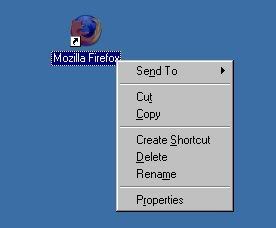
http://i279.photobucket.com/albums/kk127/Edy-rapper/openfirefox.jpg

Then i go to 'start' to open firefox from there and still doesn't happen anything. Then i hover cursor over icon and see the location in the 3rd picture.
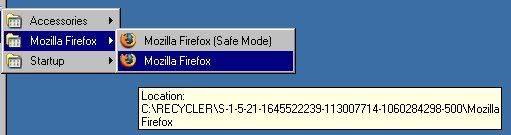
http://i279.photobucket.com/albums/kk127/Edy-rapper/firefoxlocation.jpg


What's my computer's problem? Confused By the way: I have Windows XP.
  • Topic Stats
  • Top Replies
  • Link to this Topic
Type: Discussion • Score: 1 • Views: 376 • Replies: 2
No top replies

 
McGentrix
 
  1  
Reply Mon 4 Aug, 2008 01:01 pm
Re: What's up with my computer?
Jamal Jeffris wrote:
Hey guys. I'm new here Razz.

When i try to install something, (e.g: Cheat Engine ; Firefox ; a video), the icons appear as usual but this is how they look like:
http://i279.photobucket.com/albums/kk127/Edy-rapper/icon.jpg


There is no extension on the file name and therefore your computer does not know what program to associate with it.

Quote:
When i want to open firefox i double-click it or press 'enter'. But when i do that doesn't happen anything. When i right-click the icon to click 'Open' i see the menu like in the 2nd picture. If it wasn't for 'Run', (where i write firefox and opens it for me), i had to open firefox installer every day.
http://i279.photobucket.com/albums/kk127/Edy-rapper/openfirefox.jpg


You are looking at a shortcut. You can tell by the arrow on the icon which indicates that it is a shortcut.

Quote:
Then i go to 'start' to open firefox from there and still doesn't happen anything. Then i hover cursor over icon and see the location in the 3rd picture.
http://i279.photobucket.com/albums/kk127/Edy-rapper/firefoxlocation.jpg


What's my computer's problem? Confused By the way: I have Windows XP.


You have deleted the program and it is in your recycle bin. Open your recycle bin, find the program, right click and choose restore to place it back where it was.
0 Replies
 
Jamal Jeffris
 
  1  
Reply Mon 4 Aug, 2008 04:15 pm
..
man.. u didn't help me at all Confused. i think u didn't even know wat u were sayin' Neutral.

Recycle Bin is empty.

Shourcut, main icon - the same fing happens.

& 'bout da extension.. i think u were right. but how i find extension? Shocked
0 Replies


Related Topics

Clone of Micosoft Office - Question by Advocate
Do You Turn Off Your Computer at Night? - Discussion by Phoenix32890
The "Death" of the Computer Mouse - Discussion by Phoenix32890
Windows 10... - Discussion by Region Philbis
Surface Pro 3: What do you think? - Question by neologist
Windows 8 tips thread - Discussion by Wilso
GOOGLE CHROME - Question by Setanta
.Net and Firefox... - Discussion by gungasnake
Hacking a computer and remote access - Discussion by trying2learn
 
  1. Forums
  2. » What's up with my computer?
Copyright © 2026 MadLab, LLC :: Terms of Service :: Privacy Policy :: Page generated in 0.04 seconds on 01/01/2026 at 07:54:42